Quick Summary:
Running a growing business on spreadsheets and disconnected tools? This guide breaks down what ERP actually is, whether your business needs one, and what to look for before you buy.
You'll walk away knowing:
- Whether your business has outgrown manual billing and traditional spreadsheets
- How ERP systems evolved over time
- What an ERP system means and does (in plain English)
- How to evaluate your options without getting overwhelmed
There comes a point beyond which a lot of growing businesses begin to face significant operational challenges. The reason? The different software that each of your departments now uses (that was procured as and when deemed necessary) works in isolation. As a result, the flow of information is manual, slow, and prone to errors.
If this scenario is relatable, what your business needs is an enterprise resource planning software, or ERP for short. This post will tell you everything you need to know about them, along with tips on how to evaluate if your business needs one and how to go about picking the right one for you.
What is an Enterprise Resource Planning System (ERP)?
An ERP system is nothing but a software solution that does the following:
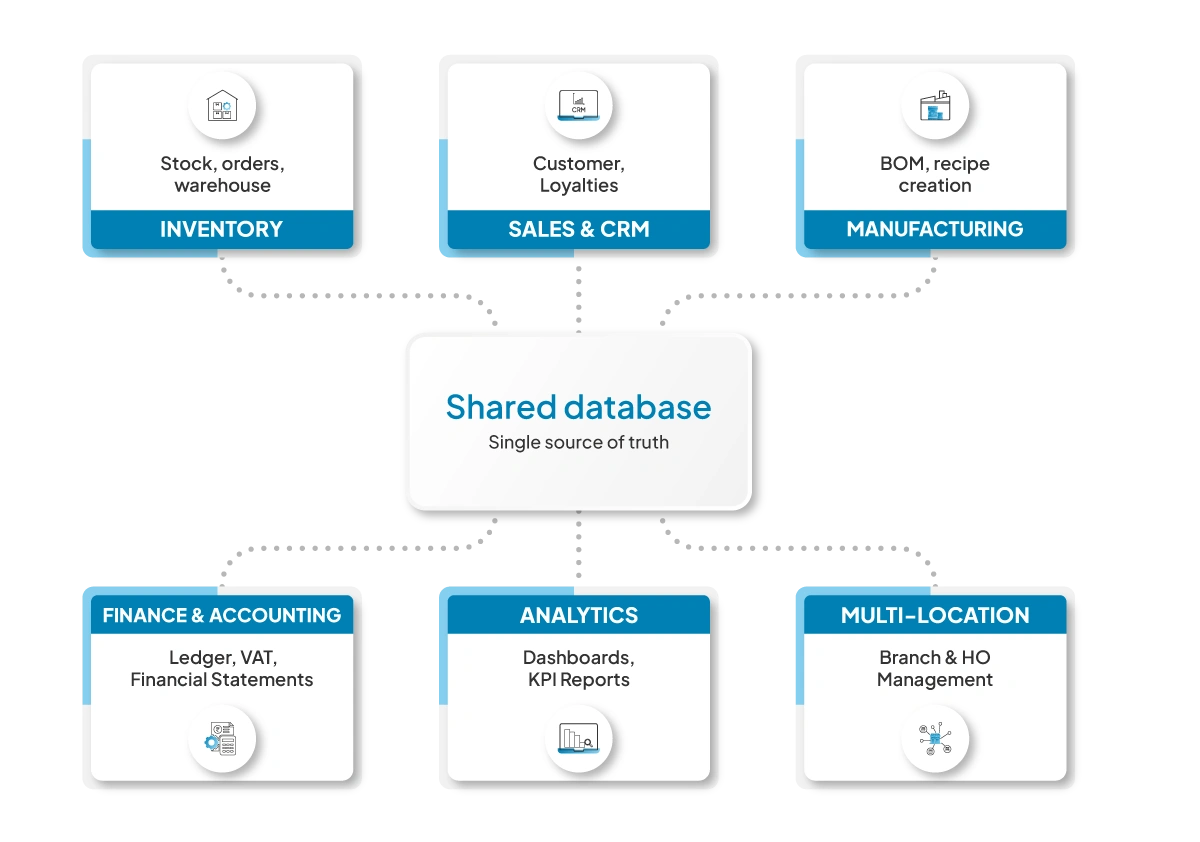
- It connects all your existing systems (accounting, inventory, and CRM) in a manner that each now uses a shared data source.
- In doing so, it improves coordination across departments.
- It eliminates manual data duplication.
- It enables real-time reporting.
Simply put, it’s software that integrates and manages all essential business processes into one platform.
The Evolution of ERP Systems
The origins of modern ERP systems can be traced back to the 1960s when J.I. Case, an American farm machinery manufacturing company, first pioneered concepts in inventory and manufacturing management.
This led to the creation of Material Requirements Planning (MRP) systems, providing manufacturers with a more scientific way of managing raw materials and procurements.
1970s-1980s: MRP Systems Come into Their Own
The increasing need for manufacturers to have more control over their production process led to the widespread adoption of MRP systems in the 1970s. By the 1980s, MRP systems had already transformed into MRP II systems, which not only addressed material requirements but also manufacturing scheduling, shop floor management, and financial management. All of this was done in-house, requiring huge investments in hardware and technology.
1990s-2000s: From Integrated to Cloud-Based ERP Systems
The 1990s marked the arrival of real-time Enterprise Resource Planning (ERP) systems that integrated all business functions like finance, HR, procurement, supply chain, and manufacturing.
In the early 2000s, the industry witnessed a major breakthrough in ERP systems when they transformed from traditional licensed-based systems to cloud-based systems.
2020 and Beyond: AI-Driven ERP
Today’s ERP systems are smarter and more adaptive than ever, powered by big data and AI. As the AI revolution reshapes the ERP landscape, businesses that embrace these advancements early stand to gain the most competitive advantage going forward.
Types Of ERP Software
ERP solutions (depending on the software and the solutions provider) can be deployed in three different ways.
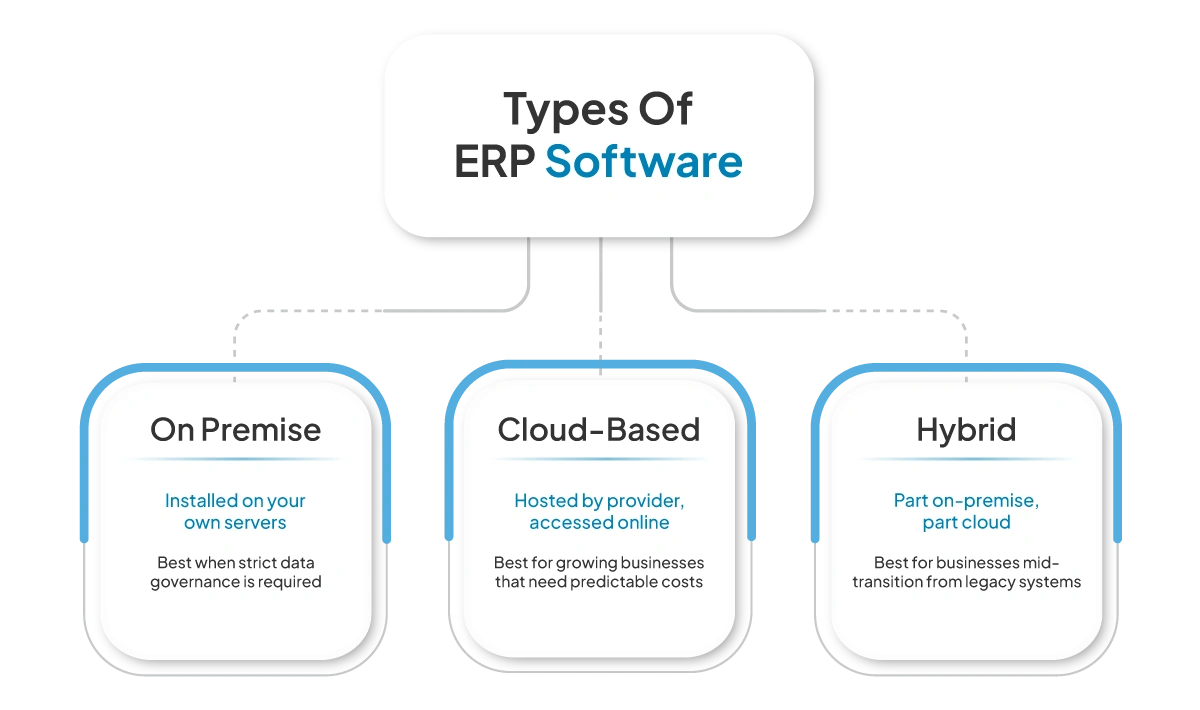
1. On Premise
An on-premise ERP system is installed on a company’s internal servers. This type of system works well only if the regulations require strict data governance. Otherwise, for most growing businesses, it is more infrastructure (and the time and resources required to maintain it) than they need.
2. Cloud-Based Systems
Cloud-based ERP systems run on the solution provider’s servers. You access the system via a secure connection. You don’t need to worry about maintaining and updating your servers or the ERP system. As these systems operate on subscription-based pricing, they work best for growing organisations that value predictable expenses and scalability.
Quick Fact According to Adinga's South Africa ERP Report, a Cape Town-based retailer reduced costs by 15% in the first year after implementing a cloud ERP system to automate inventory and order management.
Source:Adinga
3. Hybrid Systems
These ERP systems are a mix of both. Some of their functions are on-premise, and others are in the cloud. They work best for businesses mid-transition from legacy systems or with specific data compliance requirements.
What Does ERP Software Typically Include?
An ERP system consists of several modules, each of which companies can deploy individually based on their operational needs. The list includes:
1. Inventory Management
This module tracks:
- Your stock levels across locations.
- Purchase orders
- Warehouse transfers
- Supplier information and so on.
With it, every sale, return, and inter-branch transfer updates the central stock record the moment it happens. Depending on the solution provider, you can also expect to see features like barcode management, batch or expiry tracking, product pricing matrices, and automated stock alerts.
2. Finance & Accounting
An ERP system’s finance modules manage the following:
- Your General Ledger
- Accounts payable and receivable
- VAT reporting
- Financial statements
This allows your finance teams to work with up-to-date, consolidated financial data. In addition to the above list, some also provide automated bank reconciliation, expense tracking, cash flow monitoring, tax compliance reporting, and automated journal entries, which further reduce the need for managing your books manually.
3. Sales, CRM & Customer Data
An ERP’s sales modules track:
- Customer profiles
- Quotations and invoices
- Payment status
- Sales pipelines
With the CRM module, your sales teams see each customer’s entire journey from one place. To further support operations, you can see features like delivery tracking, customer communication history, credit management, and integration with point-of-sale systems or e-commerce platforms.
4. Manufacturing / Operations
For manufacturing businesses, enterprise resource planning software can include:
- Bill of materials
- Production scheduling
- Resource planning
- Work order tracking
For product-based businesses, this connects production planning, raw material tracking, and bill of materials to procurement and finance.
5. Reporting & Analytics
With the reporting and analytics module, you get live data from every module in dashboards that reflect what is happening right now in the form of:
- Real-time dashboards
- Department performance metrics
- Profitability analysis
- Operational KPIs
Finally, solution provider dependent, you also get customisable reports, exportable data formats, drill-down analytics, and visual charts that can help the decision-makers in your business make better decisions faster.
How Do ERP Systems Work?
The backbone of an ERP system is a single shared database. Every module reads from and writes to the same central database, and as a result, every minute update is reflected across all its modules. Here is how that works in practice.
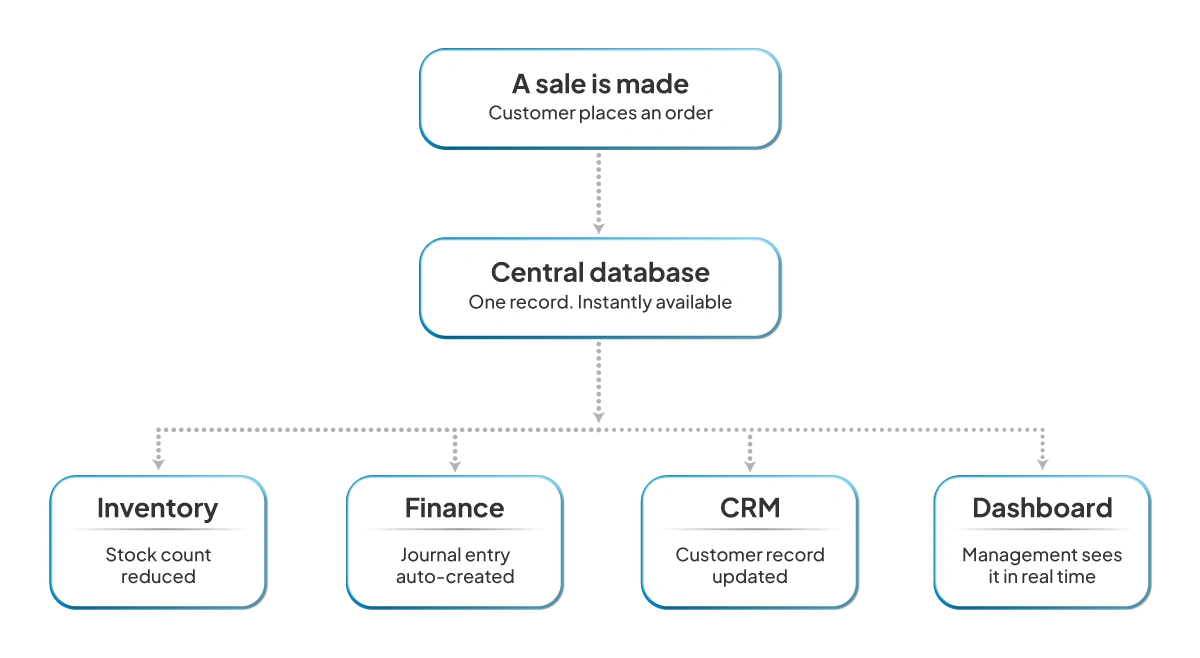
- A sales order automatically reduces inventory.
- The same gets reflected across your financial records.
- The same sale is reflected in that specific customer’s record.
- Management sees the same on their dashboard in real time.
With an ERP system, you no longer need to rely on or wait for manual reconciliation between departments.
Key Benefits Of Implementing ERP Software
An ERP system provides measurable advantages.
- Centralised Information: All your teams work with the same “live” data.
- Reduced Errors: With live data, you eliminate the need for manual data updates or handoffs, each of which can introduce errors.
- Faster Reporting: Financial and operational reports are generated instantly. You are no longer waiting for weekly or monthly reports to make decisions.
- Scalability: ERP system solutions support multi-branch or multi-department expansion without the need to replace their core infrastructure.
Did You Know? According to SAP Africa News Center, South Africa's ERP market is growing at a CAGR of 14.9% between 2024 and 2030, making it one of the fastest-growing enterprise software markets in Africa.
Source:SAP
Who Should Use ERP Software?
You most likely need ERP software if:
- You run more than one location, and you depend on manual reports or phone calls to get a bird’s-eye view of your operations.
- You experience frequent mismatches between your physical stock count and your system’s inventory record.
- Your finance team spends real time at the end of the month pulling numbers from different sources.
- You have lost sales to stockouts.
- You are finding it increasingly difficult to keep track of your customer data.
Contrary to popular belief, these problems are not restricted to large enterprises. You could be a small and growing business that is facing or could soon experience one or more problems in the near future. A proactive investment in an ERP will help you avoid them altogether.
Key Factors to Consider When Choosing the Right ERP Software
Before you decide on an ERP system for your business, ask yourself this:
1. Does it fit how your business actually operates? An ERP system designed specifically for the manufacturing industry may not work well for retail. Enquire if the system has been implemented for a business that operates as you do before and how it is going thus far.
2. What Does The Implementation Process Look Like? Enquire what the implementation process looks like. Gain clarity on factors like data migration, the onboarding process, and its timelines and whether support will be provided throughout and once you go live.
3. Does The Erp Connect With The Systems You Already Use? The ERP system in question should connect with your existing tech stack without the need for third-party tools and workarounds.
4. Can The System Scale With My Business? The ERP should be able to scale with your business without needing a complete overhaul every time.
How VasyERP Can Help Your Business Streamline And Scale With Ease?
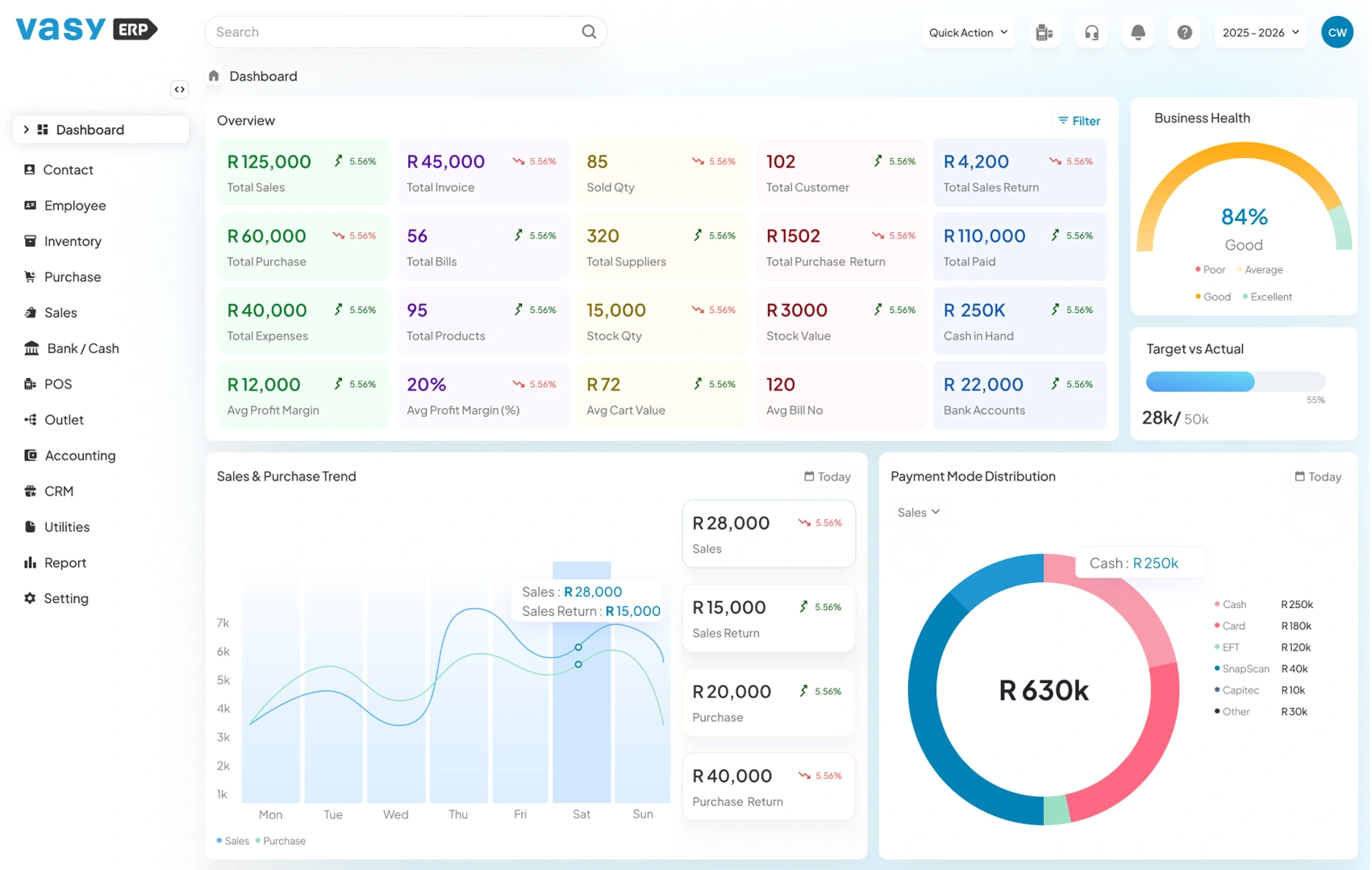
VasyERP is a cloud-based ERP system built for retail, distribution, and manufacturing businesses that have grown past what their current tools can handle. The platform integrates the following:
- Inventory management
- Finance and VAT reporting
- Sales and CRM
- Multi-location management
- Real-time analytics
- POS software
As these modules are integrated natively, every transaction is automatically reflected across every related module. For example, when a sale is made, it simultaneously
- Updates the inventory.
- Creates an entry into your financial records and generates a tax-compliant bill.
- And attaches the transaction to the customer’s transaction history.
For you as a business, this means your stock records are always accurate, and so is every customer’s activity, no matter how many channels or branches you operate. You gain insights into your company’s performance across multiple parameters in real time.
More importantly, unlike global enterprise platforms built primarily for large corporations, VasyERP focuses on structured implementation suited to local operational realities.
When Growth Is Stifled, Something Has To Change
Every growing business reaches a stage where effort alone is no longer enough. At this point, throwing money and manpower won’t make a dent. You need to fix the root cause, that is, your disconnected systems. Ask yourself one question: At what point does operating without an ERP system start costing you more than investing in one?
If you would like to see what a structured, cloud-based ERP system can do for your business, book a short walkthrough with VasyERP. Thirty focused minutes can show you whether your next stage of growth needs better tools behind it.
FAQs Regarding ERP Systems
An ERP system is a software solution that connects the core parts of a business, i.e., inventory, finance, sales, and purchasing, to one platform. With it, all systems now share a single data source, which lets all your teams work with accurate, up-to-date data.
An enterprise resource planning software ensures that everyone in your organisation, from the leadership all the way down are working off of the same data. The result is reduced operational inefficiencies and better decision-making, which ultimately works towards business growth.
Cloud-based ERP runs on remote servers and requires no local infrastructure. On-premise ERP runs on internal servers managed by your IT team. The former offers scalability and a lower upfront cost, while the latter costs more to set up and maintain but gives you more control over your infrastructure.
Yes, ERP systems, especially cloud-based ones, are suitable for small businesses. That said, only when the system fits what the business actually needs.
Last Updated on July 2, 2026