Quick Summary:
Supermarket inventory management connects purchasing, receiving, storage, shelf replenishment, POS sales, transfers, returns and waste records. This guide explains the main stock challenges, the KPIs worth tracking and a 10-step improvement plan.
You will walk away learning the following:
- How to control large product catalogues without losing track of batches, variants or pack sizes.
- Which KPIs reveal stockouts, shrinkage, poor forecasting and cash tied up in slow stock.
- How to use ABC analysis, cycle counting, FEFO and real-time POS data in daily operations.
- What to check when choosing software for single stores, supermarket groups and mixed retail-wholesale businesses.
A supermarket can sell hundreds of items before lunch while receiving new stock, processing returns and moving cartons to the shop floor. If one activity is recorded late, the system quantity starts drifting away from the shelf quantity.
That gap creates practical problems. For instance, a buyer orders stock that is already in the back room, or a cashier promises an out-of-stock item that the system shows as available. Effective grocery store inventory management closes these gaps by keeping each stock movement connected.
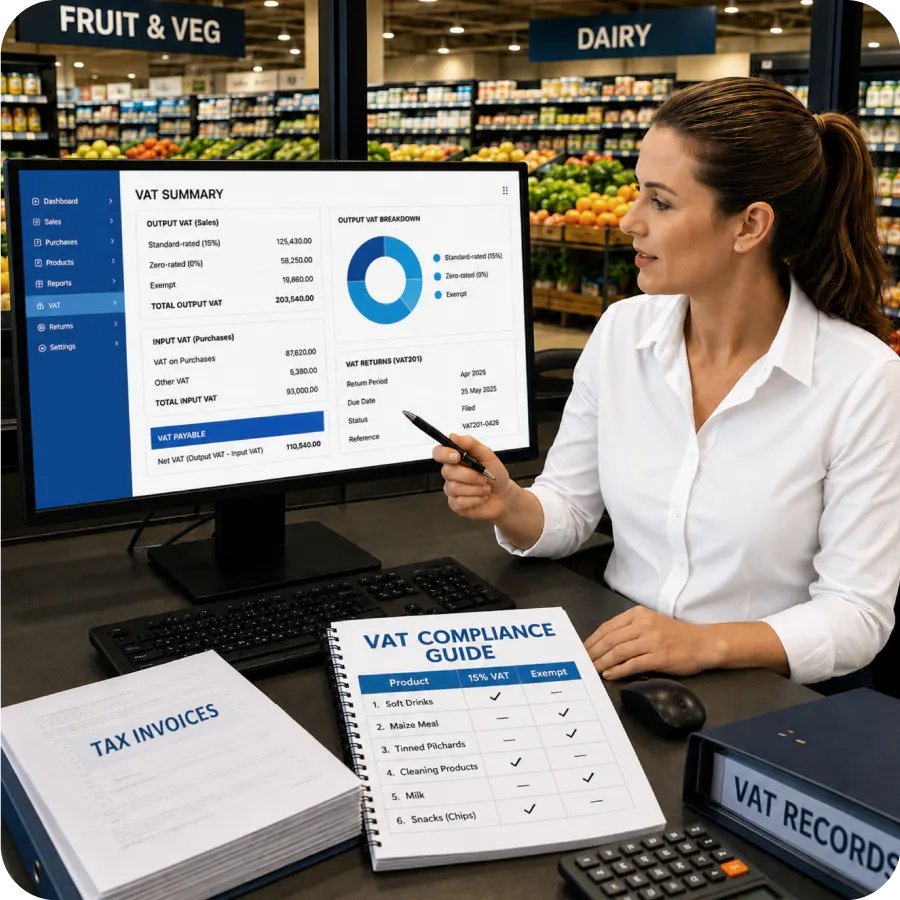
The system also needs local VAT support, multi-branch control and continuity during power or connectivity interruptions.
Why South African Supermarkets Lose Control of Stock So Quickly
Effective inventory management software for grocery store operations has to handle far more than a final stock count.
Different departments have different shelf lives, units, suppliers and selling patterns. Problems often begin where those workflows meet.
1. Thousands of SKUs Create Thousands of Chances for Error
A modern supermarket may carry several sizes, flavours and pack formats under one brand. A single product can also have more than one barcode or unit of measure. Staff may receive it by case, transfer it by pack and sell it by item.
A clean product master separates each sellable variant and keeps unit conversions clear. Duplicate codes, inconsistent names and incorrect units produce faulty orders and unreliable reports. Strong supermarket inventory management starts with disciplined product data.
2. Perishables Turn Time Into an Inventory Cost
Fresh produce, dairy, meat, bakery items and prepared foods lose value each day. A quantity can be physically present and still be commercially useless if it cannot be sold before expiry.
Your grocery store inventory management process should capture batch dates, shelf life and storage location at receiving. Staff can then follow first-expire, first-out rules. Temperature breaches, damage and cold-chain failures should create recorded adjustments instead of unexplained month-end losses.
3. Demand Changes by Payday, Weather, Promotion and Season
A store may sell roughly the same amount of milk, bread and household basics for several days, then see demand jump at month-end or before a public holiday. Rain, school breaks, promotions and nearby events can change the pattern again.
For stronger inventory management for grocery store purchasing, forecasts should combine recent sales with available stock, pending orders, supplier lead times and planned offers. Branches often sell the same category at different rates, so one national average can create both shortages and excess.
4. Each Department Runs on a Different Rhythm
Grocery, produce, bakery, butchery, liquor and household goods do not share one replenishment pattern. Bakery ingredients may move into production before finished goods reach the shelf. Produce may arrive daily, while household products arrive weekly or monthly.
Department managers need room to act, but head office still needs common receiving, waste, transfer and stock-count rules.
5. Thin Margins Leave Little Room for Hidden Losses
A small pricing error, a supplier short delivery or unrecorded waste may look minor at an item level. Across thousands of transactions, it can remove a meaningful share of profit.
Supermarket inventory management should connect quantity with landing cost, selling price, discount and margin. A fast seller may still perform poorly after a cost increase. Batch-level margin shows this before the next order.
6. Fragmented Systems Create Phantom Stock
When POS, purchasing, accounting and inventory sit in separate tools, staff re-enter the same information several times. A transfer may leave one branch but never appear at another. A supplier credit may reach accounts without correcting stock. A spreadsheet count may be updated days after the physical check.
Connected records reduce these blind spots. VasyERP links sales, purchases, inventory, accounting and multi-location operations. Supermarket teams can use OCR bill capture, batch tracking, low-stock alerts, stock-ageing reports, and two-way transfer verification from the same system.
Did you know? Avery Dennison's 2026 global study estimates that food waste across the supply chain will cost US$540 billion in 2026. The research covered 3,500 food retail and supply-chain leaders.
Source:Avery Dennison
The Numbers That Reveal Stock Performance
These KPIs turn grocery store inventory management into a measurable process. For inventory management for grocery store operations, the figures also show where action is needed first.
1. Inventory Turnover Rate
Inventory turnover shows how often stock is sold and replaced during a period. A common formula is cost of goods sold divided by average inventory value.
Track turnover by department and category. A low rate can signal over-ordering, weak demand or poor pricing. A very high rate may expose insufficient safety stock and lost sales between deliveries.
2. Shrinkage and Expiry Loss Percentage
Shrinkage covers the gap between recorded stock and physical stock. Causes include theft, damage, receiving errors, incorrect scanning and unrecorded consumption. Expiry loss should be tracked separately so managers can see which part comes from shelf-life failure.
Compare each loss with sales or stock value by department. One company-wide figure can hide produce waste or repeated receiving shortages.
3. Shelf Availability and Stockout Frequency
A system quantity of 12 means little if all 12 items are in the back room. Shelf availability checks whether shoppers can actually find the item during trading hours.
Track stockout events, duration, and estimated lost demand for important products. POS history understates demand after stock reaches zero, so review recent sales velocity and substitute sales.
4. Gross Margin Return on Inventory Investment
GMROI compares gross margin with the average cost of inventory held. It helps you judge how effectively each rand invested in stock produces gross profit.
A high-margin product can still deliver weak GMROI if it sits for months. A lower-margin staple may perform well because it turns quickly.
5. Forecast Accuracy
Forecast accuracy compares expected demand with actual demand. Use the same method consistently across stores and categories. Weighted absolute percentage error can be more useful than a simple average when product volumes vary widely.
Review errors after promotions, holidays, and supply interruptions. Focus on the products that are repeatedly over-ordered or under-ordered.
A 10-Step Plan to Cut Waste and Keep Shelves Full
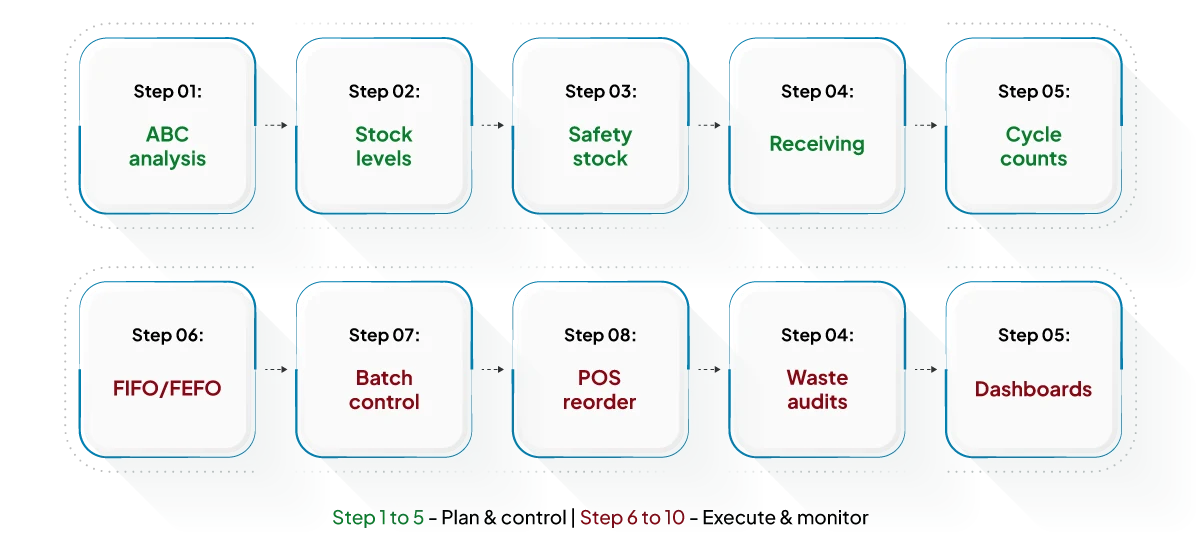
The strongest inventory management for grocery store operations combines clear rules with frequent, small actions. The following steps are practical enough for one store and structured enough for a growing chain.
Step 1: Classify Products With ABC Analysis
Group products by commercial importance:
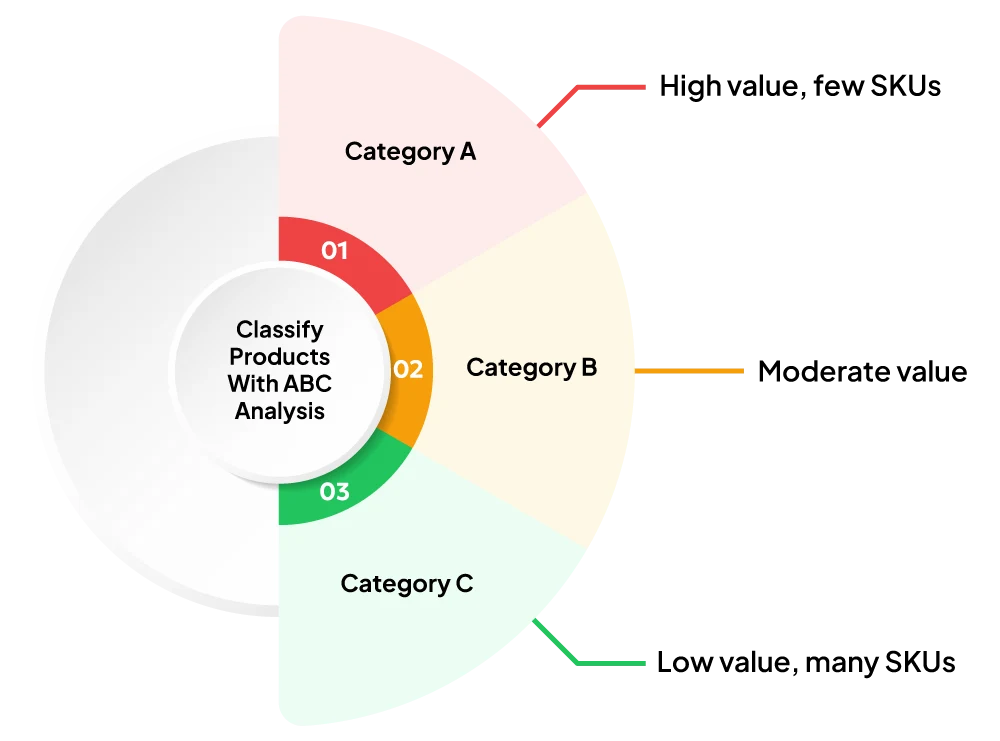
- Category A normally contains the items that contribute the most sales value or margin
- Category B sits in the middle
- Category C contains lower-value or slower-moving lines
Add movement, margin, shelf life and customer importance to sales value. Milk may carry a modest margin but still deserves close control because shoppers expect it to be available.
Step 2: Set Minimum and Maximum Stock Levels
A minimum level triggers replenishment before the shelf empties. A maximum level prevents the order from exceeding available space or likely demand.
Set thresholds by store and review them as lead times change. The same cereal may need different limits in Johannesburg and a smaller regional branch.
Step 3: Calculate Safety Stock for Uncertain Items
Safety stock protects the store when demand rises or a supplier arrives late. It should reflect demand variability and lead-time variability, rather than a flat extra quantity for every SKU.
Hold more protection for essential, volatile or slow-to-replace products. Reduce it where suppliers are dependable, and lead times are short.
Step 4: Tighten Receiving and Supplier Checks
In grocery store inventory management, receiving is the first defence against phantom stock. Count and inspect goods before acceptance. Match the purchase order, delivery note and supplier invoice, then record shortages, damage, batches and expiry dates immediately.
OCR can speed up invoice capture, but staff should still verify the extracted fields. VasyERP’s OCR workflow can read product, quantity, price and supplier details from invoice images or PDFs, reducing repeated manual entry.
Step 5: Replace One Big Count With Daily Cycle Counts
Count a small, selected group each day. High-value, high-risk and fast-moving items should be checked more often than stable C items.
Cycle counts keep discrepancies small enough to investigate. VasyERP supports stock verification for up to 50,000 records, helping larger supermarkets complete detailed stock audits more efficiently.
Step 6: Use FIFO and FEFO Correctly
FIFO moves the oldest received stock first. FEFO moves the batch with the earliest expiry first. For dated food, FEFO is usually the safer operational rule because two deliveries may arrive out of expiry sequence.
Make expiry order visible in the back room and on picking screens. Staff should not have to open several cartons to find the correct batch.
Step 7: Digitise Batch and Expiry Control
Capture manufacturing dates, expiry dates, batch numbers and quantities at receiving. Near-expiry alerts create time to transfer, promote, return or mark down goods.
VasyERP supports batch-wise expiry tracking, near-expiry alerts and restrictions on selling expired items. It displays the latest batch price in product listings and lets administrators control who can modify batch or master prices.
Step 8: Link Replenishment to Live POS Sales
Every completed sale should reduce available stock. Reorder suggestions can then use sales velocity, current stock, minimum levels, open orders and lead times.
This connection is central to grocery store inventory management because it removes the delay between checkout and purchasing. A hybrid POS also protects continuity during network interruptions and then synchronises transactions when the connection returns.
Step 9: Audit Waste Every Week
Use clear adjustment reasons for expiry, spoilage, damage, samples, internal use and counting corrections. A single “waste” code gives managers too little information.
Compare waste by product, department, supplier and cause. VasyERP creates an audit trail for expiry, wastage, samples and internal consumption while adjusting stock.
Step 10: Give Managers Role-Based Dashboards
Department managers need current sales, stock, waste and margin data for their own area. Owners and the head office need a combined view across branches.
Role-based access protects sensitive data while keeping decisions close to the work. VasyERP dashboards filter by date, location and sales channel. VasyERP also provides active-batch margin reporting and lets the main outlet control where branches or franchises can transfer stock.
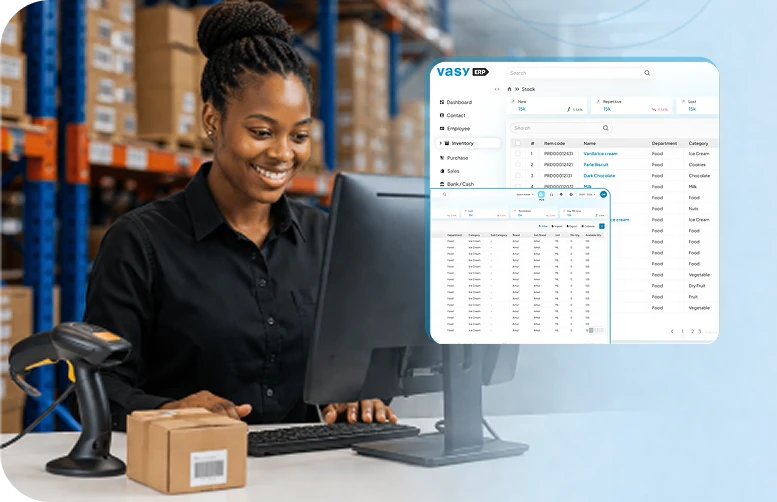
Connect POS sales, purchases, stock transfers, batch & expiry tracking, waste records, & VAT-ready accounting in one platform.
Request a DemoThe Technology Giving Grocers a Clearer View of Every Aisle
For supermarket inventory management, technology should eliminate repetitive work and make exceptions easier to identify. It should not add another disconnected screen to the store.
1. Electronic Shelf Labels
Electronic shelf labels can update prices centrally and reduce the gap between the POS price and the shelf price. They are especially useful for frequent promotions and near-expiry markdowns.
The operational benefit depends on integration. A label should receive an approved price from the same product and pricing records used by the till. Otherwise, the store simply replaces one manual update with another system mismatch.
2. Cloud ERP With Multi-Store Synchronisation
A cloud ERP gives head office and branch teams one view of stock, purchases, transfers and sales. This supports inventory management for grocery store groups by helping them move excess stock before placing another order.
VasyERP can prevent transfers that would create negative stock when negative quantities are disabled. It also supports VAT-based inter-outlet transfers with automatic document generation, helping South African supermarket groups keep branch movements accurate and properly recorded.
3. IoT Temperature Monitoring
Connected sensors can record temperature in cold rooms, fridges, freezers and delivery vehicles. Alerts help staff act before a temperature breach becomes a full batch loss.
Sensor data is most useful when linked to product, batch and incident records. The manager can then identify what was exposed, for how long and what action was taken.
4. Barcode and Weight-Scale Integration
Barcodes reduce product-selection errors and speed up receiving, counting and checkout. Scale integration is important for loose produce, deli goods, meat and other products sold by weight.
VasyERP supports barcode generation, weight-scale integration, product variants and multiple barcodes. It can also manage products purchased by carton, transferred by pack and sold as individual items, reducing manual conversion errors.
Four Inventory Problems and the Practical Fix for Each
The same failures appear in stores of different sizes. Reliable inventory management for grocery store teams turns each failure into a visible exception with a defined response.
Problem 1: Repeated Stockouts
Fix: Use live POS depletion, minimum levels, supplier lead times and automated reorder alerts. Review false stockouts where the system shows stock, but the shelf is empty. These usually point to replenishment, receiving or record errors rather than purchasing alone.
Problem 2: High Spoilage
Fix: Capture batches and expiry dates, use FEFO picking and create near-expiry action lists. Markdowns, transfers and supplier returns should happen early enough to recover value. A report produced on the expiry date is too late.
Problem 3: Disconnected Branch Data
Fix: Keep outlet stock and transfers in one cloud system. Require dispatch and receipt confirmation, then investigate goods left in transit. Central visibility lets a manager move stock from a slow branch to a high-demand branch instead of buying more.
Problem 4: Cash Trapped in Dead Stock
Fix: Review ageing, turnover, margin and sell-through together. Stop automatic replenishment for dead lines and use controlled markdowns, bundles, supplier returns or branch transfers. VasyERP inventory reports provide batch-level margin data, while stock-ageing reports help identify inventory that has stopped moving.
Moving From Spreadsheets to ERP Without Disrupting the Store
A grocery store inventory management rollout should improve control without slowing checkout or receiving. A phased plan makes the change easier for staff and exposes data problems before they spread.
Step 1: Map the Current Workflow
Document how products are created, ordered, received, transferred, counted, returned, wasted and sold. Identify every spreadsheet and manual approval. This gives you the real scope of supermarket inventory management rather than a software feature list.
Step 2: Pilot a High-Turnover Department
Choose a department with frequent movement and clear measures, such as packaged grocery or dairy. Run product setup, receiving, counting, replenishment and reporting through the new process.
A useful pilot should include normal sales, returns, damage and supplier discrepancies. Clean results under easy conditions prove very little.
Step 3: Train Staff Around Daily Tasks
Train cashiers, receivers, buyers and department managers on the screens they actually use. Give them short procedures for barcode errors, offline billing, transfer receipt and batch selection.
Use real store products during training. Staff remember a familiar milk delivery or produce weigh-up more easily than a generic software example.
Step 4: Roll Out by Branch and Department
Move in controlled phases and freeze uncontrolled spreadsheet changes once each area goes live. Clean product masters and opening stock before migration.
VasyERP supports the migration of purchase, sales, debit note, credit note, payment and receipt transactions from previous software.
Step 5: Review Exceptions After Go-Live
Track negative-stock attempts, unmatched transfers, price overrides, count variances and delayed purchase entries. These show where the new process still depends on workarounds.
Hold short weekly reviews for the first two months. Fix the cause, update the procedure and retrain the relevant role instead of correcting the same error repeatedly.
What to Check Before Choosing Supermarket Inventory Software
The right grocery store inventory management system should fit the store’s workload and remain understandable for staff. Good inventory management for grocery store software should cover the following areas:
- Product and Batch Depth: Check variants, multiple barcodes, weighted goods, flexible units, batch pricing, expiry dates and FEFO support
- Connected Operations: Confirm that POS, purchasing, receiving, inventory, returns, waste, accounting and online orders update one stock record
- Multi-Branch Control: Look for location-level availability, controlled transfers, central pricing, role-based access and consolidated reports
- South African Readiness: Confirm VAT handling, tax invoices, local currency, relevant payment methods and offline continuity
- Implementation and Reporting: Ask about data migration, onboarding, support, stock verification, ageing, margin, turnover and exception reports
VasyERP brings inventory, POS, purchasing, accounting and multi-branch control together in one system. South African supermarkets can manage VAT-ready transactions, barcode-based stock movement, automated reorder rules, real-time sales synchronisation and offline billing from the same platform.
It also connects payments, reporting, loyalty programmes, waste tracking and online sales, giving supermarket teams a clearer view of stock and sales across departments and branches.
Conclusion: Build a Leaner, More Predictable Supermarket Operation
Accurate supermarket inventory management comes from many small controls working together. A disciplined grocery store inventory management process cuts the time spent reconciling numbers and gives staff more time to act on exceptions.
Better inventory management for grocery store operations also protects working capital by reducing excess orders, avoidable spoilage and repeat stockouts. With VasyERP, South African supermarkets can manage POS, inventory, purchasing, VAT-ready accounting and multi-store operations from one connected platform.
Last Updated on July 16, 2026