
Quick Summary:
Enterprise resource planning systems can streamline your business operations across the board. That said, investing in them is only worth it if your business actually needs one. If your business has reached that stage, the next step is finding one that fits the needs of your South African business. This guide will help you with both scenarios.
You'll walk away knowing:
- The five telltale signs that indicate your business needs an ERP.
- The 10 selection criteria that matter for South African businesses.
- How to avoid the common ERP selection mistakes businesses tend to make.
An investment in an enterprise resource planning system for a business is usually considered a step in the right direction for any growing business. That said, this works if and only if you pick the right ERP system for your business.
Choose wrong, and you are looking at significant disruptions in your operations, coupled with the losses that come along with it, which a large number of businesses fail to recover. In South Africa, this decision needs even more careful consideration due to the unique nature of doing business here (more on this later). Before that, let’s understand more about ERP systems.
What is an ERP system?
An ERP system is one that connects and manages your entire business, from inventory, sales, purchases, and accounting to reporting, etc., on one platform. The primary advantage: every change reflects instantly across the board without the need for any manual intervention.
But before you evaluate vendors, the first question to answer is whether your business is actually ready for one.
What Are the Signs That Your Business is Ready for an ERP?
There are some businesses that grow just fine with a few basic tools. However, if you, as a business owner, start experiencing the following, it could be time to consider investing in an enterprise resource planning system.
- Your systems don’t talk to each other: If your teams manually move data between all your systems, you need an ERP. This process is slow and error-prone and is the foundation of all other signs of needing one.
- Your stock numbers never match: Due to the dependency on manual updates, you experience stock mismatches very frequently.
- You cannot get real-time reports: You need to wait hours or days before you can get a report on, say, sales figures across all your outlets.
- You are struggling with SARS compliance: SARS compliance, critical for any business operating in South Africa, is a nightmare for your accounting teams.
- You are struggling to scale your business: If you are struggling with scaling your operations, it’s time to consider an ERP.
Pro Tip: Do not wait for things to get out of hand. The best time to implement enterprise resource planning systems is when you see two or more of these signs, not when your current system completely breaks down.
Interesting Fact: The ERP market in South Africa is growing at a rate of14.9% CAGR and is forecasted to hit $538.1 (US$M) in revenues by 2030.
Source:Grandview Research
How to Select the Right ERP System?
Most ERP choices end up wrong because the generic process goes like this: complaints start with vendor research, then watching demos, comparing prices, and then realising that the software doesn’t fit their requirements. The key is to flip the script. Assess your needs first before you look at vendors, and here is how to go about it.
1. Conduct a Business Process Audit
Map out how your business works today. Write down every step from purchase order to final sale. Where do delays happen? Where do errors creep in? Which tasks take up the most time? This audit becomes your shopping list.
2. Gather Stakeholder Input From Every Department
Your warehouse and accounting teams have different tasks and duties to fulfil. Ask everyone what frustrates them about current systems. What would they keep? What would they change? Ignoring this step leads to low adoption after implementation.
3. Classify Requirements Into Two Categories
Create two lists. Must-have features are non-negotiable. Your business stops working without them. Nice-to-have features are valuable but not critical. This classification helps you compare vendors objectively.
The 10 Essential ERP Selection Criteria
The core of how to select the right ERP system is based on the following criteria. 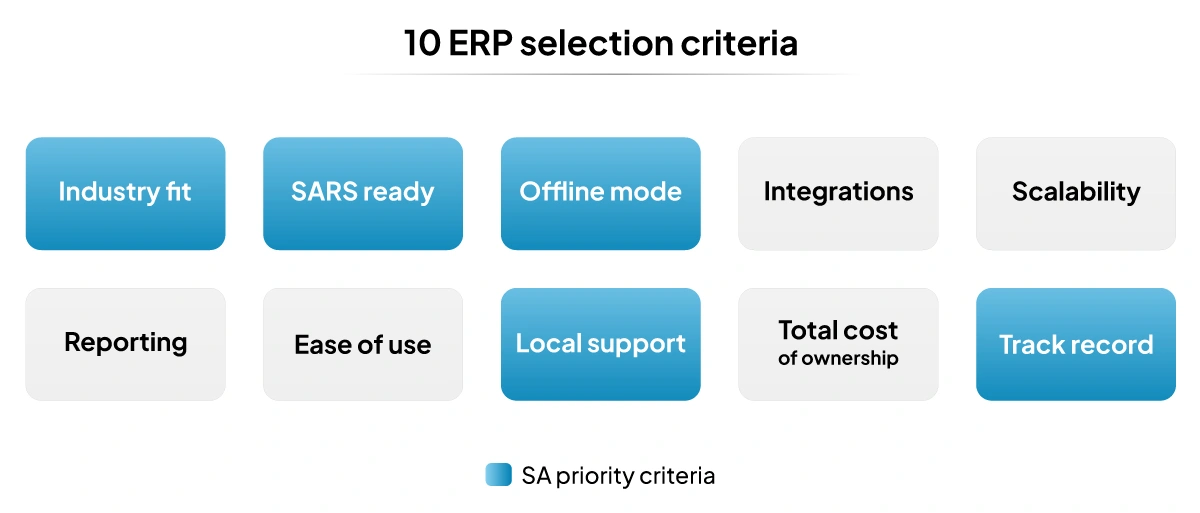
1. Industry Fit
Generic enterprise resource planning systems will not cut it for, say, a retail or a manufacturing business. These industries need specific features like batch tracking and expiry management, supplier management, barcode scanning, and so on.
Ask the vendor if their product is purpose-built for your specific industry and which clients in your niche they already serve in South Africa.
2. SARS Compliance
Every business operating in South Africa needs to adhere to the local tax laws. The ERP system in question should be able to handle VAT accurately and generate SARS-compliant invoices. Check with the vendor if this is built into the system by default and how regulatory updates are handled by the vendor and the system.
3. Offline Functionality
Load shedding, while dramatically reduced, is still a reality in many parts of South Africa. To address this, the ERP in question should continue to work without internet and sync back once the connection is restored. Ask for a demonstration of how the system functions during an outage.
4. Integration With Existing Tools
The system in question should connect natively with all your existing tools without the need for custom development. This applies especially for standard integrations. Verify, with a list of your existing tools, if the system can integrate easily with them.
5. Scalability of the ERP
The ability to scale your business, when you add new product lines or locations, should happen just as easily as integrations. Check if there is an upper limit to the number of locations or users the system can handle.
6. Reporting and Real-time Data
One of the major pluses of an ERP is the ability to gain real-time insights into your operations and make better decisions because of it. Understand the depth of the system’s reporting capabilities and if it supports further customisation for those niche reporting requirements.
7. Ease of Use
The returns of investing in an enterprise resource planning system depend directly on how effectively your staff can use it. The UI should be easy to navigate, and the training requirement for the switch should not be too complex.
Ask for a demo of one or two complex processes with the relevant member of the staff who will use it to witness it and assess the software’s complexity.
8. Local Vendor Support
When something breaks, your teams should be able to get the assistance they require to get the system back up and running as soon as possible. Verify if the vendor has a localised presence in South Africa or is offering support via a third party.
9. Total Cost of Ownership
The monthly subscription is not the only cost. You also need to factor in implementation, training, data migration, and support costs. Ask for a full breakdown of everything before you sign anything.
Interesting Fact: Only 50% of ERP implementations are completed as per budget.
Source:Panorama Consulting Research
10. The Vendor’s Implementation Track Record
Ask for references from businesses in your industry and at your scale. A vendor with a proven track record in South African retail is a different proposition from one whose local references are limited.
The ERP Selection Process Step by Step
Here is a practical 5-step process to find your ERP. Follow these steps in order. 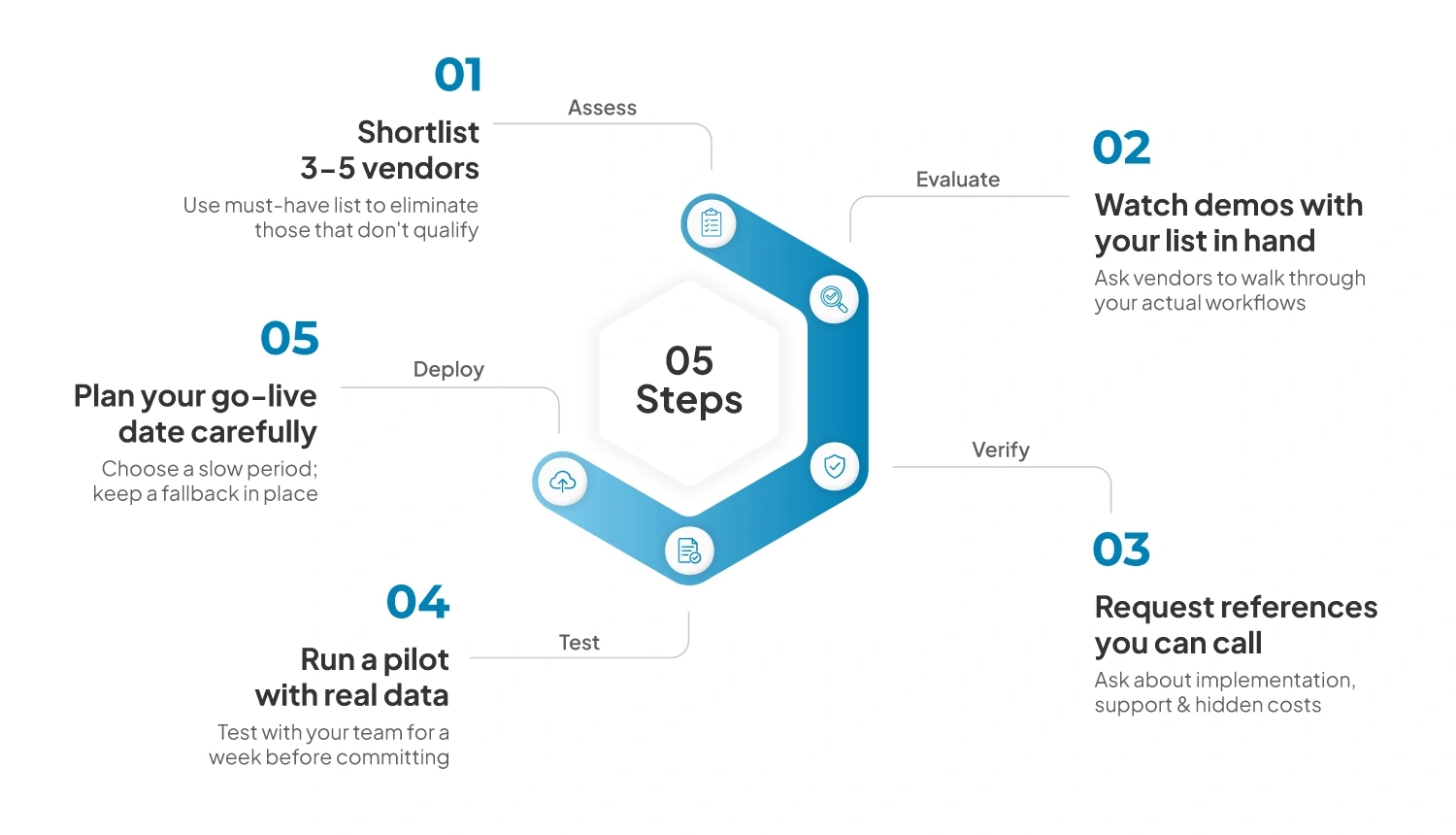
Step 1: Shortlist 3 to 5 vendors.
Use your must-have list (covered earlier) and eliminate any vendor that cannot meet those requirements. Your shortlist should include a mix of global and local options.
Step 2: Watch Demos with Your List in Hand
Ask each vendor to walk through your specific workflows. Like how a purchase order becomes a stock receipt in your system or how a return gets processed.
Step 3: Request References You Can Call
Ask each vendor for at least two current clients in South Africa. Call them. Ask about implementation, support, and any hidden costs, along with what they wish they knew before they signed.
Step 4: Run a Pilot with Real Data
Before you commit, test the system with your actual data. Get your team to use it for a week. Doing this reveals problems that may not arise during the demo.
Step 5: Plan Your Go-live Date Carefully
Do not go live during your busiest season. Choose a slower period and keep a fallback option in place in case something goes wrong.
Common ERP Selection Mistakes to Avoid
Mistakes and biases can derail even the most thought-out decisions. Here are five mistakes to avoid when choosing an enterprise resource planning system.
Mistake 1: Going With the Cheapest Option
In the case of ERPs, cheapest is not always best. In a lot of cases, you end up paying for add-ons that work out to be more expensive in the long run.
Mistake 2: Do Not Go Based on Brand Names Alone
Yes, Salesforce and SAP are big names in the ERP space, great for globalised large-scale enterprises but not the best options for smaller South African businesses’ needs. Look for a system that is localised and built for your scale.
Mistake 3: Selecting Without End-user Input
Poor adoption is where most ERP implementations fail, and this is because the people who use the software are not in the decision loop.
Mistake 4: Ignoring Offline Requirements
Evaluating an enterprise resource planning system without testing its offline capabilities is another common oversight decision-makers make.
Mistake 5: Not Assigning a Clear Owner for the Implementation Process
ERP implementations that lack a dedicated owner on the business side routinely run over time and budget. Decide who in your organisation owns this process end-to-end and make sure they have the time and authority to do it properly.
Cloud ERP vs. On-premise: Which is Right for You?
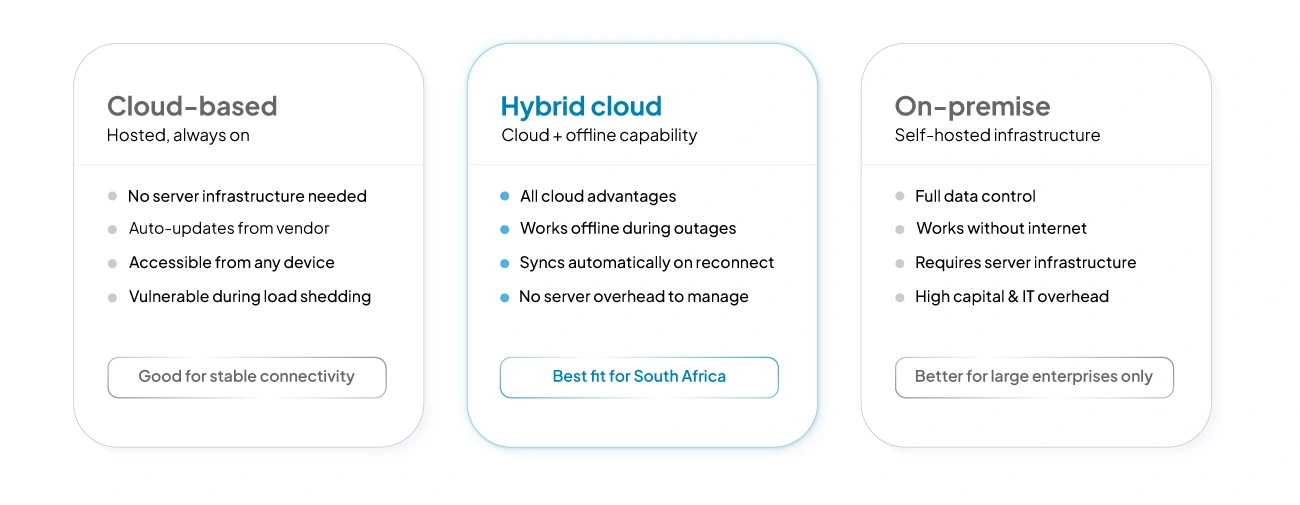 For most South African SMEs, cloud-based enterprise resource planning systems are the practical default in 2026. They require no server infrastructure, update automatically, and are accessible from any device across multiple locations.
On-premises systems offer greater data control and can function without the internet but are best suited for large enterprises with the capital and resources to maintain them.
The best option for a South African business is a hybrid cloud-based system that gives you all the advantages of a cloud-based system and the ability to function offline like an on-premises system without the overhead.
Why is VasyERP the Right Choice for South African Businesses?
Most enterprise resource planning systems were designed for stable markets with reliable infrastructure and large IT teams. VasyERP is built specifically for retail, wholesale, and distribution businesses operating in South Africa, and here is how:
- The system handles batch tracking, barcode scanning, supplier management, and multi-price mapping out of the box.
- One dashboard shows stock across all your warehouses and stores. Stock transfers include two-way verification to prevent discrepancies. Reporting is real-time, and you have over 150 report templates to choose from.
- The POS and core functions work without the internet during an outage or planned load shedding and sync with the cloud once the network is back up.
- Local compliance is built into every transaction. VAT handling is automatic and generates invoices that meet SARS requirements by default.
- Ease of use drives the design. The interface is intuitive, and your staff can be trained on how to use it in a few days.
- Finally, you get localised support with a dedicated account manager, and implementation is designed for businesses without dedicated IT teams.
Last Updated on July 3, 2026