Quick Summary:
Still relying on scattered sales records, manual stock checks, and delayed reports to understand how your store is performing? This guide explains what POS reports are, how they work within a modern retail setup, and how they enable businesses to make better decisions.
You'll walk away knowing:
- Which POS reports are most important for day-to-day retail management
- What each report helps you track, from sales trends to payment patterns and stock movement
- How better POS reporting helps reduce guesswork and improve business decisions
Retail businesses generate a lot of information every day, but that alone does not help much if it is distributed across different places. When the numbers are harder to view together, it becomes harder to identify issues and determine the next step.
POS reports turn transaction data into organised views of sales, stock, customers, payments, employees, and financial performance. Instead of depending on separate spreadsheets, retailers get a clearer picture of what is happening in the business and where action is needed.
What Are POS Reports?
POS reports are structured summaries created from the data captured by a point-of-sale system. They bring together information such as transactions, item movement, discounts, taxes, returns, payment methods, and customer activity so businesses can review performance in a more organized way. POS reports give businesses a clearer read on what is happening in the store.
They show which products are selling well, which ones are not moving enough, how different counters or branches are performing, whether customers are coming back more often, and which payment methods people are using most.
How POS Reporting Works Inside a Modern POS System
POS reporting begins as soon as a transaction is recorded, with each bill updating multiple parts of the system at once. This usually includes the following:
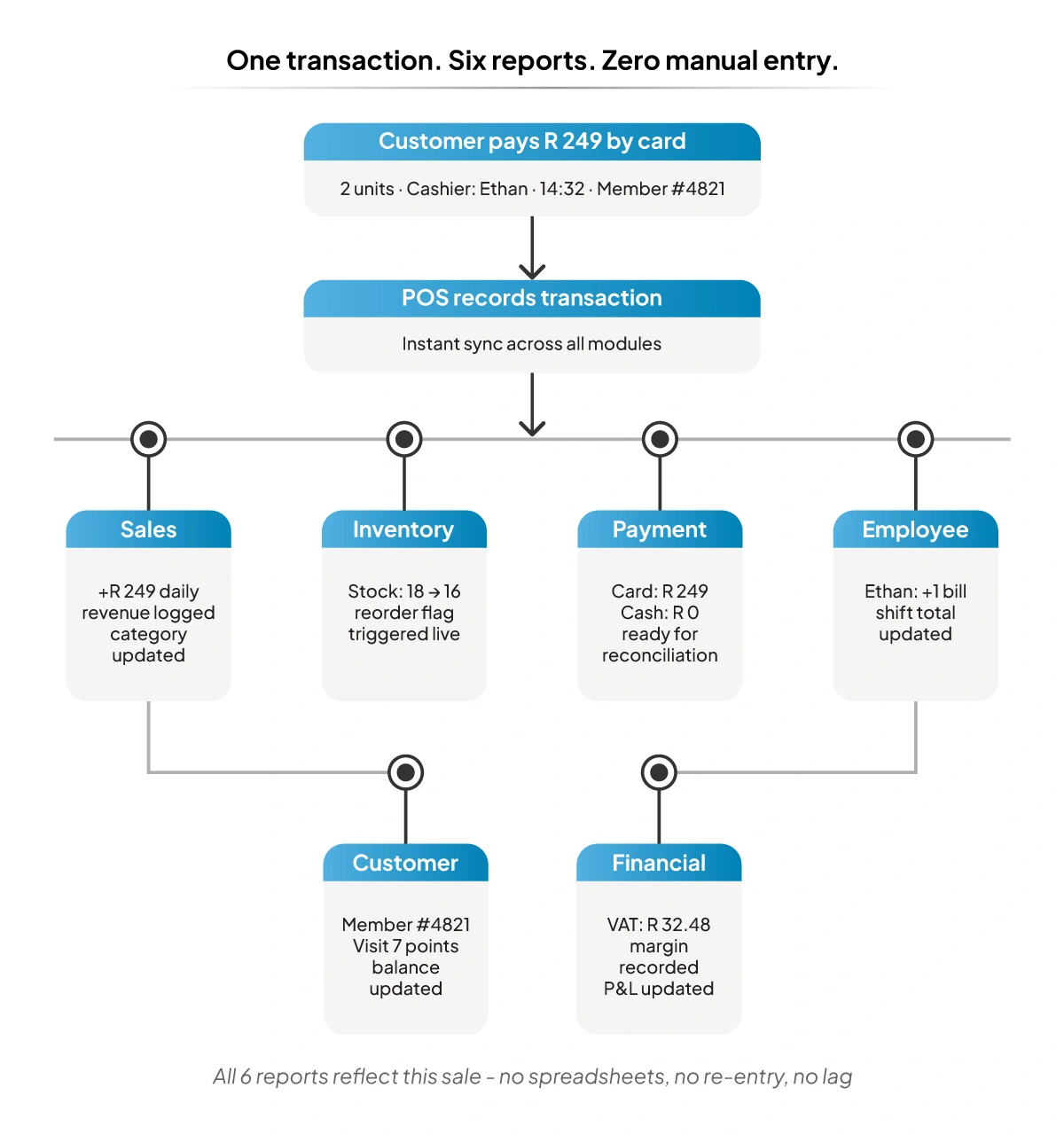
- Sales value, quantity sold, discounts, and tax
- Stock levels and item movement
- Payment mode used for the transaction
- Customer purchase history, where available
- Data that can later be reviewed by owners, finance teams, store managers, and operations staff
The value of this reporting becomes much clearer when the POS system is connected to the wider retail operation. Sales may appear strong at first, but that view can change when discounts rise, important products start running low, or profit margins begin to weaken.
Why POS Reports Are Critical for Growing Businesses
As a business grows, reporting becomes more important because the number of products, transactions, employees, locations, and payment modes also grows. Without clear reports, even routine decisions become slower and less reliable.
1. Visibility into Daily Operations
POS reports give managers a more detailed picture of daily performance. Sales can be reviewed by timeframe, category, product, or location, which helps highlight changes sooner. That added detail makes it easier to see whether one store, one category, or a short promotion shaped the day’s results.
2. Control Over Cash Flow and Inventory
Healthy sales do not always mean healthy operations. Cash can still get tied up in slow-moving stock, and popular products can still go out of stock at the wrong time. Inventory-linked reports help businesses keep a closer eye on stock movement, replenishment timing, and demand patterns so that capital is used more efficiently.
3. Accountability Across Teams
Reporting also improves accountability. When managers can review billing activity, sales by employee, store-level performance, returns, and payment patterns more clearly, staffing and training decisions become more grounded. Instead of depending only on observation, businesses can review how teams are actually performing and where support is needed.
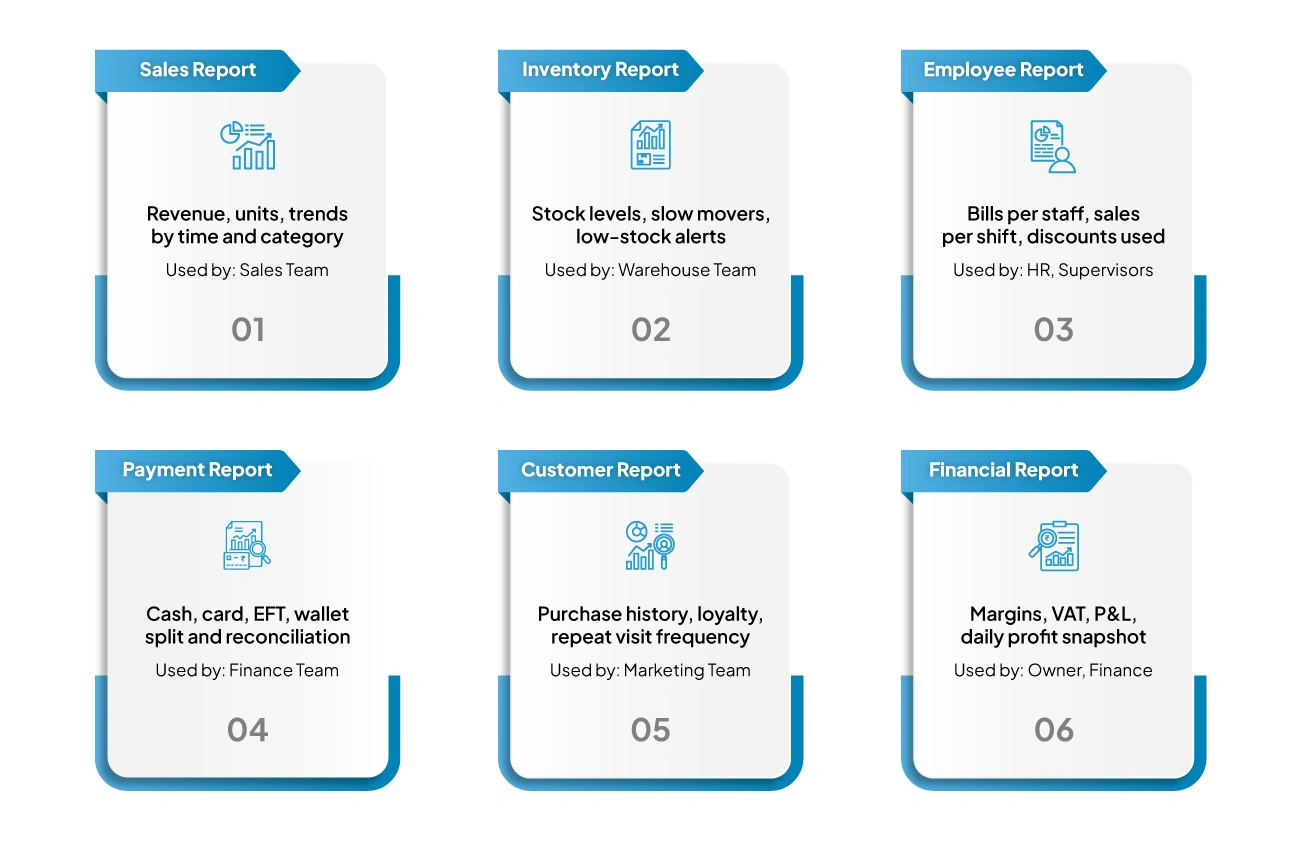
The 6 Most Important POS Reports Every Business Should Track
Some reports are essential because they affect daily retail decisions more directly than others. These are the reports most businesses should review regularly.
1. Sales Reports
A POS sales report helps businesses keep track of results across a chosen time period. A better report should reflect how sales changed across the day, week, and month, while showing which products sold strongly and which ones were less in demand.
That makes it easier to work out what to promote, what to replenish, and which categories need another review. It also helps when assessing store performance, pricing, and stock requirements.
2. Inventory Reports
Inventory reports show what is currently available, what is nearly out of stock, what has built up too much, and what is not selling fast enough. Low-stock indicators and tracking for slower items are important because they influence sales, cash flow, and customer satisfaction at the same time.
Important FactRetailers globally lose about $1.73 trillion a year to out-of-stocks and overstocks.
Source:IHL Services
3. Employee Reports
Employee reports show how each staff member is contributing to sales and billing. They make it easier to see who is selling more, who may need support, and whether performance changes between shifts or store locations.
They are also useful when reviewing staff performance and planning schedules. In a retail setting, actual billing and sales numbers give a clearer picture than personal impressions alone.
4. Payment Reports
Payment reports break transactions down by payment method and help retailers reconcile collections more accurately. A breakdown across cash, card, EFT, and other digital payment options is especially useful because payment behaviour continues to shift across South African retail.
A useful payment report supports daily reconciliation, checkout planning, and exception tracking. It can also show whether digital payment methods are gaining ground faster than cash or cards in a particular store format, which can help shape device planning and payment workflows.
5. Customer Reports
Customer reports focus on buying behaviour. Purchase history, loyalty trends, and repeat visit analysis are all useful because growth is not only about bringing in new customers but also about keeping existing customers engaged.
6. Financial Reports
Financial reports connect POS activity to overall business performance. Revenue, margins, tax insights, daily summaries, and profitability snapshots all matter because sales volume alone does not show whether the business is improving financially.
POS Report Examples You’ll Use in Real Life
The best way to make sense of POS reports is to look at the reports that the teams check in day-to-day store operations. Each one covers something different, and together they show a broader picture of business performance.
1. Daily Sales Summary Report
This report gives a quick view of daily revenue, number of bills, discounts, taxes, returns, and payment mix. This is often the first report managers open because it gives a simple summary of the day in one place. For a straightforward POS report example, this is usually the best one to begin with.
2. Product-Wise Sales Report
This report shows which products and categories are selling and which are not. It helps retailers identify strong performers, weaker lines, and product trends that may influence stock decisions or promotions.
3. Invoice & Billing Report
This report shows bill-level information such as taxes, discounts, payment types, and transaction activity. It is useful for checking records, reviewing daily billing, and looking into cashier-level entries when needed.
4. Customer Purchase Report
This report shows what customers tend to buy and how often they return. It can also show when their buying pattern starts to change. That is useful for follow-ups, repeat purchase campaigns, and offers based on real customer activity.
5. Scheduled & Automated Reports
These reports are generated on a set schedule instead of being pulled by hand every time. That saves effort and helps keep reporting regular.
Important FactContactless payments now account for more than two out of three transactions globally.
Source:MasterCard
Business Benefits of Using POS Reports Effectively
When reporting is reviewed consistently, it helps retailers act sooner and with better context.
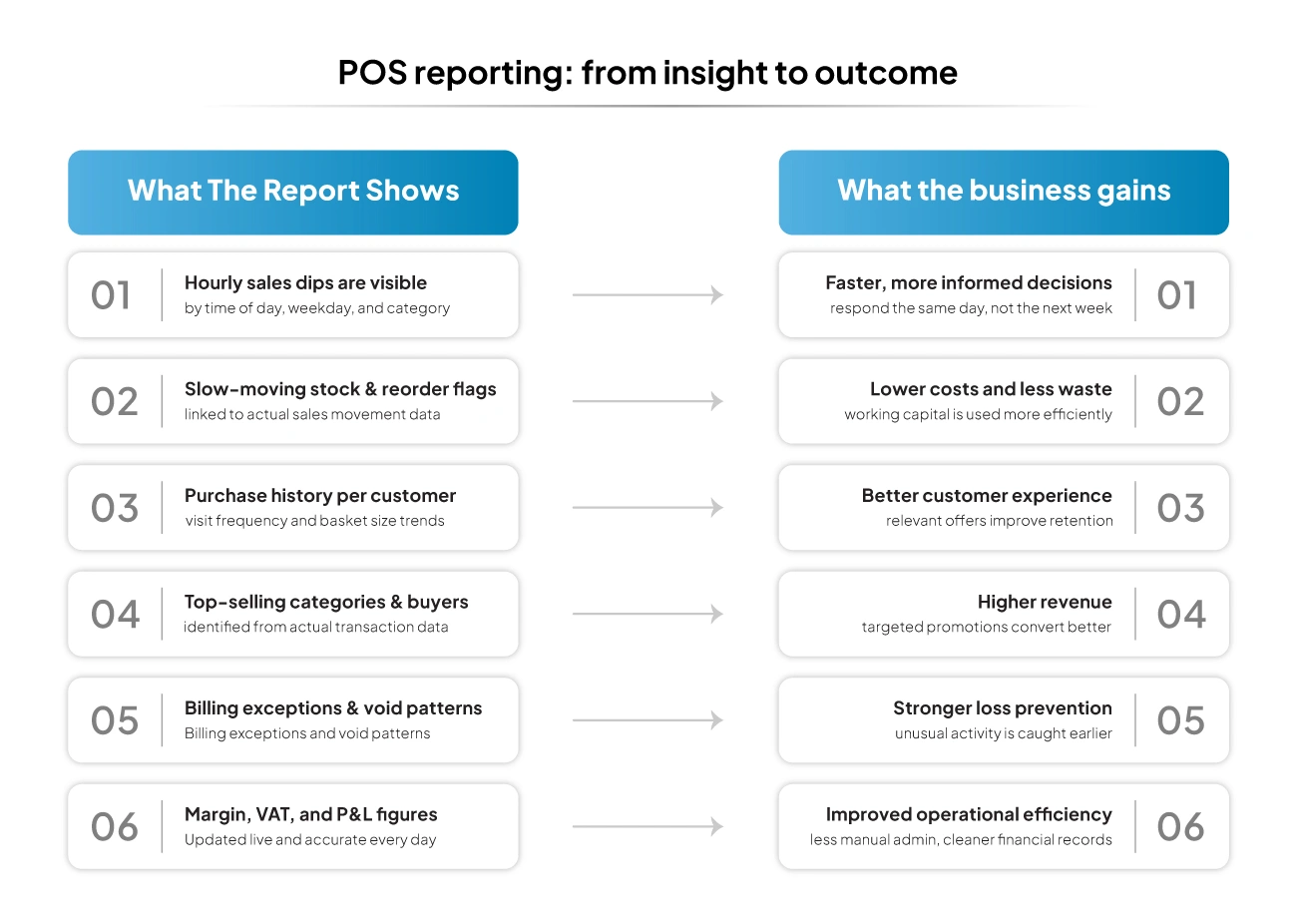
1. Faster and Better Decision-Making
Managers can review actual sales patterns, stock movement, payment behaviour, and outlet performance instead of depending on scattered updates or delayed spreadsheets.
2. Improved Operational Efficiency
When reports highlight low stock, slow-moving products, uneven billing activity, or unusual payment patterns, teams can respond earlier and with less manual checking. This reduces wasted time and keeps routine operations more organised.
3. Better Customer Experience Through Data
Customer reports help retailers understand purchase history, buying preferences, loyalty behaviour, and repeat visits. That makes it easier to shape offers and service interactions in a more relevant way.
4. Higher Revenue With Targeted Promotions
When a business knows which categories are performing well, which customers buy more often, and which products need support, promotions become more focused. That improves the chance of better conversion and more efficient use of discounting.
5. Improved Security and Fraud Monitoring
Detailed billing, payment, and employee-level reports give businesses a clearer way to check for unusual activity. Unexpected voids, unusual returns, or payment mismatches are easier to investigate when reporting is easy to read and available on time.
6. Lower Costs Through Smarter Planning
Better stock visibility and demand tracking reduce the risk of over-ordering and stockouts. Over time, this supports stronger use of working capital and lower avoidable losses.
Key Components of a Powerful POS Reporting System
A reporting system is only useful if people can read it quickly, trust the numbers, and act on what they see.
1. Clear and Easy-to-Understand Dashboards: Reports should be simple enough to read quickly without burying the important numbers. A dashboard that is too cluttered slows decisions instead of supporting them.
2. Real-Time and Accurate Data: Reports are most useful when they reflect what is happening now or very recently. Delayed or inconsistent data weakens decisions on stock, staffing, payment review, and promotions.
3. Customisable Reports for Different Roles: Store owners, finance users, outlet managers, and floor supervisors do not all need the same view. A strong reporting system should allow reports to be adjusted by role, columns, and business need.
4. Connected Accounting, Inventory and CRM Workflows: Reporting works better when business data stays connected. When billing, inventory, accounting, and customer data sit in one system, businesses do not have to piece together performance manually from separate tools.
Common Mistakes to Avoid in POS Reports
Businesses often generate reports but still fail to get enough value from them because of how the reports are used. Common mistakes include:
- Reviewing reports too late
- Focusing only on total sales and ignoring margins or payment mix
- Overlooking low stock and slow-moving inventory
- Failing to track repeat purchases and loyalty behaviour
- Using dashboards that are too cluttered
- Reading reports without turning them into action steps, such as reordering, repricing, training, or promotional changes
How VasyERP POS Reports Help Businesses Make Data-Driven Decisions
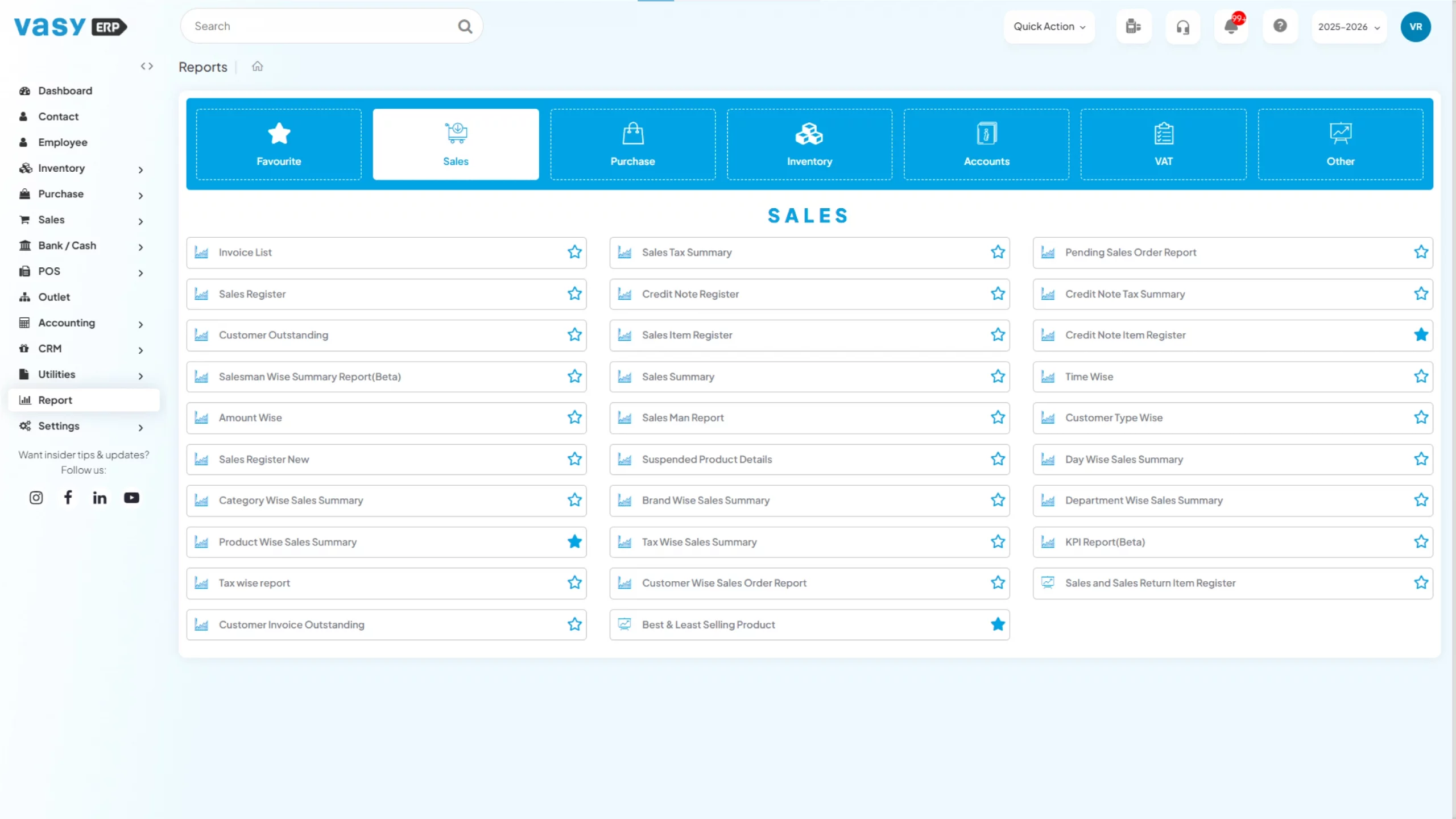
VasyERP makes reporting part of the regular retail process instead of leaving it as a separate back-office job. Its POS software includes 150+ built-in reports, plus analytics across sales, customers, suppliers, inventory, and demand trends. That gives businesses a more direct way to check performance without stitching data together manually. What makes that more useful in practice is the way reporting connects with other retail functions. With VasyERP, businesses can work with:
- POS sales reports that show sales trends, top-selling items, weaker lines, and performance across stores
- Real-time sales entry updates through integrated accounting
- Financial reports, balance sheets, profit and loss statements, and VAT compliance support
- Inventory reporting that helps reduce stockouts and surplus stock issues
- Multiple payment integrations for smoother billing
- Loyalty and membership programme support
- Customer details such as last visit, last bill amount, most purchased items, and loyalty points
This connected setup makes POS reports more practical to use day to day. Retailers can review sales trends, track stock movement, monitor payment behaviour, and keep a closer eye on financial performance from the same system.
Instead of moving between disconnected records, they get one working view that supports faster and more informed decisions. Decisions around stock, billing, customer retention, and profitability are closely linked. VasyERP helps bring those moving parts together, so POS reports help businesses act on what the numbers are showing.
FAQs Regarding POS reports
Think of them as the "health check" for your business. Instead of just a long list of transactions, POS reports pull all that raw data together into a readable summary. They show you what was sold, who sold it, and how much tax was collected, so you don't have to do the math yourself at the end of the shift.
It takes the guesswork out of running a shop. Instead of "feeling" like Tuesdays are slow, pos reporting gives you the hard numbers. You can see exactly when your peak hours are to schedule staff properly, or spot which "best-sellers" are actually eating your margins, allowing you to make moves that actually protect your profit.
In most cases, yes. Since most systems are cloud-based now, you can pull up your POS reports on your phone while you're at home or travelling. It's a lifesaver for owners who need to keep an eye on things without being tethered to the front desk.
POS reports make it much easier to see what is selling quickly, what is sitting too long, and which items are close to running low. That means you can reorder with better timing, avoid tying up money in excess stock, and reduce the chances of disappointing customers because a popular product runs out.
Most POS reports are designed to be read by business owners and store managers, not just accountants. You do not need to be confident with financial terms to understand the basics. Once the reports are set up properly, you can usually check sales, payments, stock movement, and customer activity without needing to dig through complicated spreadsheets.
Last Updated on June 28, 2026