Quick Summary:
Still trying to manage a growing storefront with manual tallies and disconnected records? This guide breaks down exactly how a POS system works, why it beats traditional billing, and the essential features you need to look for to keep your inventory and payments in sync.
You'll walk away knowing:
- Whether your business has outgrown manual billing and traditional spreadsheets
- What a POS system actually does for your daily operations (in plain English)
- How to sync your inventory and payments without the technical challenges
- How to evaluate your options without getting overwhelmed
At the checkout stage, products are added to the bill, the system calculates the total, payment is accepted, and the sale is saved as part of the business records. A POS system manages this entire process.
Understanding the POS system helps businesses bill customers correctly and maintain organised records. Stock levels and sales information update automatically as transactions take place.
What Is a POS (Point of Sale) System?
POS system meaning refers to the technology used by businesses to complete sales transactions. POS stands for Point of Sale, which is the stage where payment is collected from the customer.
A POS system combines software and hardware to:
- Process transactions
- Accept payments
- Generate receipts
- Record sales data
- Update inventory automatically
What is POS system in practical terms? It is the system businesses use to bill customers and record sales at checkout.
The same system records transactions and updates inventory automatically, helping businesses keep records accurate.
How a POS System Works?
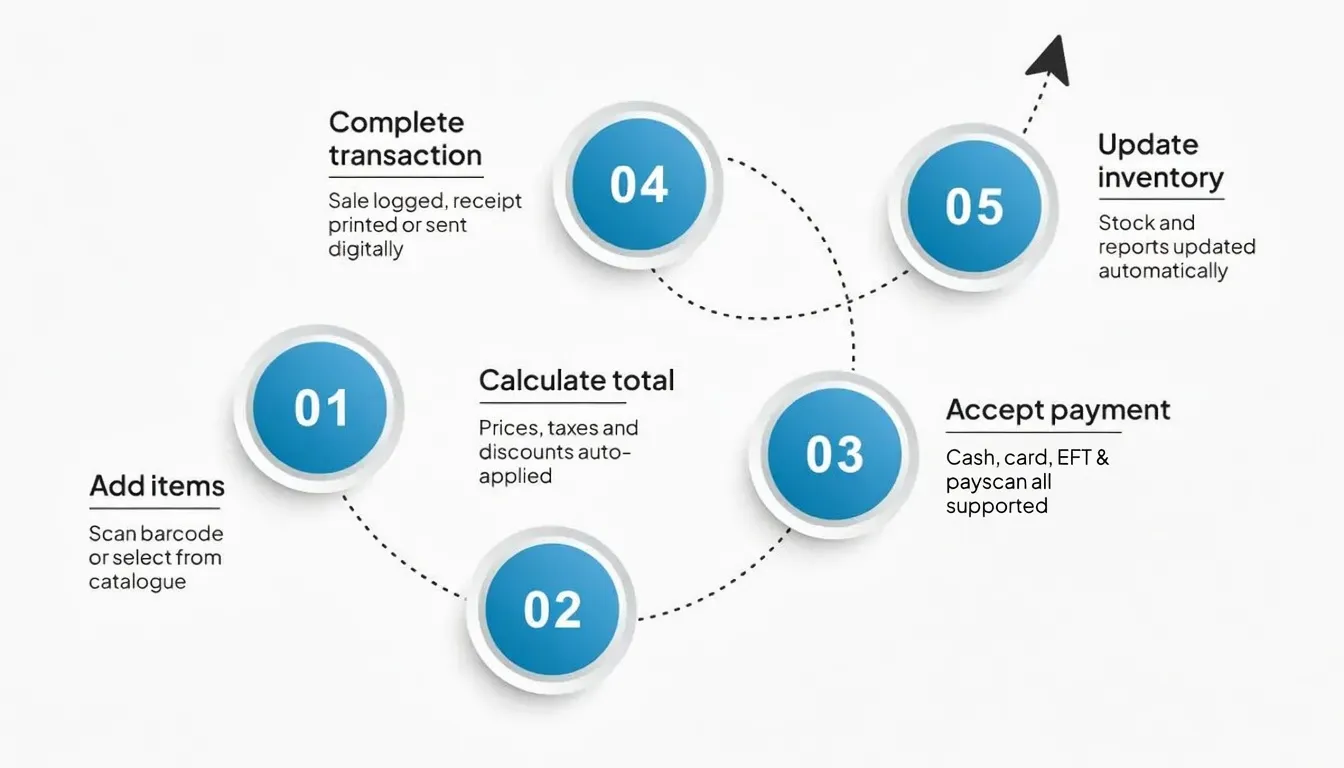
A POS system manages the checkout process from the moment products are selected until payment is completed. The typical process follows a series of steps during checkout.
1. Adding Items to the Bill
The checkout process begins when products are added to the bill. In most retail stores, this is done by scanning product barcodes with a barcode scanner. The product details appear as soon as the barcode is scanned. This usually includes the item name, price, and tax settings linked to that product.
Items may also be entered manually through the POS interface. The product catalogue usually groups items by category and includes variations and pricing details. After selection, the item appears on the billing screen with its quantity and price.
2. Calculating the Total Amount
The POS system calculates the bill after all products have been added. It uses the stored item prices and the tax rules already set up in the system.
Discounts, promotional offers, and other pricing rules are applied at this point if they are available. This reduces manual work at the counter and helps avoid uneven billing.
3. Accepting Payment
Once the bill is confirmed, the customer proceeds with payment. A POS system supports multiple payment options so that businesses can accept different payment methods at checkout. Common payment methods include:
- Cash
- Credit cards
- Debit cards
- EFT
- Snapscan
If payment is made by card or digitally, the POS system sends the transaction for processing through the payment terminal or gateway. Approval confirms that the payment has gone through.
4. Completing the Transaction
The POS system then records the transaction in the system. The entry usually contains the items purchased, the payment method, and the date and time of the sale.
A receipt is then generated. Depending on the system setup, the receipt may be printed or shared digitally through email or SMS.
5. Updating Inventory and Reports
Once the sale is completed, the POS system updates the inventory records. The quantity of each item sold is deducted from the available stock.
At the same time, the transaction becomes part of the reporting data. Sales reports, revenue summaries, and product performance data get updated as new transactions are recorded.
Quick FactShrinkage costs South African retail SMMEs ~2.6% of sales, with internal theft and stock spoilage as the top culprits.
Source:Sajems
Core Components of a POS System
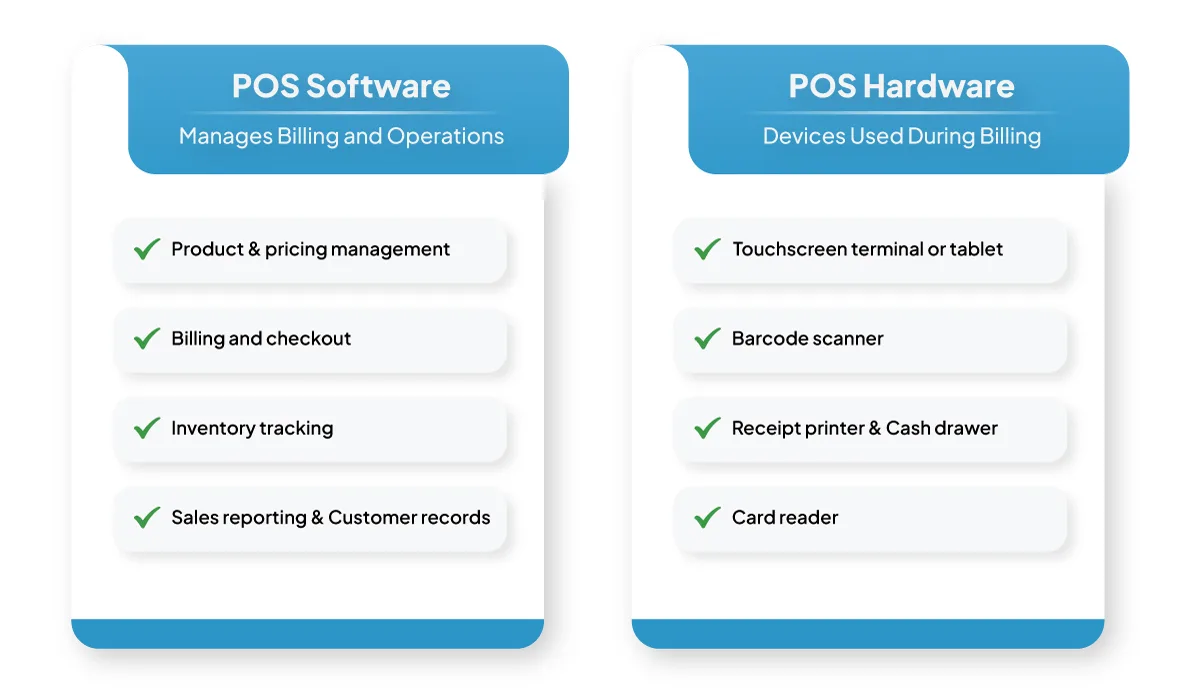
A POS system includes two primary components.
POS Software
POS software manages billing and operational functions. It handles:
- Product and pricing management
- Billing and checkout
- Inventory tracking
- Sales reporting
- Customer records
- Staff access management
The software ensures smooth and organised daily operations.
POS Hardware
POS hardware refers to the devices used during billing. Common examples include:
- Touchscreen terminal or tablet
- Barcode scanner
- Receipt printer
- Cash drawer
- Card reader
These devices help complete transactions efficiently.
With payment integration, the POS accepts digital payments and stores the sale once it is complete.
Key Features of a Modern POS System
POS systems include features used during checkout and daily store activity.
1. Fast and Accurate Billing: Barcode scanning lets staff add items quickly. The system already has the correct price, so there is less chance of input errors.
2. Inventory Management: A retail POS system tracks stock levels automatically. Inventory updates immediately after each transaction.
This helps maintain accurate stock records and improves inventory control.
3. Multiple Payment Options: POS systems allow businesses to accept various payment methods, which improves transaction flexibility.
4. Sales Reporting and Analytics: POS systems generate reports such as the following:
- Daily sales reports
- Product performance reports
- Revenue summaries
- Sales trends
These reports help businesses monitor performance and identify patterns.
5. Customer Management: POS systems store customer purchase history, helping businesses understand buying behaviour and maintain service consistency.
6. Staff Management: Managers can monitor staff activity, track sales performance, and manage system access permissions.
Types of POS Systems
Different types of POS systems support different operational requirements.
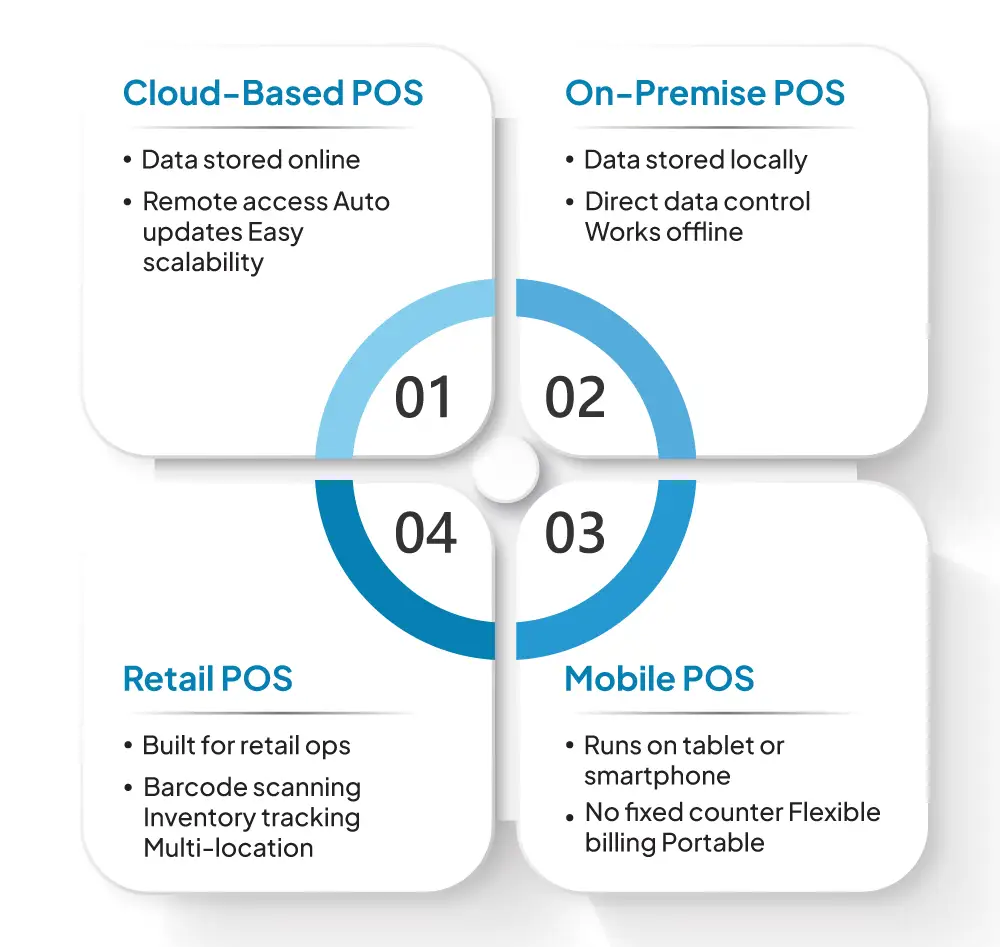
1. Cloud-Based POS System
Cloud POS systems keep business data online. This makes it possible to review reports and monitor operations without being on-site. Benefits include:
- Remote access
- Automatic updates
- Centralised data storage
- Easier scalability
Cloud-based POS systems are widely used by retail businesses.
2. On-Premise POS System
An on-premise POS system stores data locally on store computers or servers. This provides direct control over system data.
3. Retail POS System
A retail POS system is built to support the day-to-day needs of retail businesses. It supports:
- Barcode scanning
- Inventory tracking
- Product variations
- Billing and reporting
- Multi-location management
Retail POS systems help maintain consistency and operational accuracy.
4. Mobile POS System
Mobile POS systems operate on tablets or smartphones. They allow billing and payment collection without requiring a fixed checkout counter.
Benefits of Using a POS System
A POS system helps businesses keep records accurate, improve billing speed, and manage daily store work with better control.
1. Faster Checkout
A POS system helps reduce manual work during billing. Scanning products allows staff to bill items using the saved pricing in the system, without calculating totals by hand.
This is useful during peak hours, when checkout delays can affect customer flow and make the counter harder to manage. Faster billing helps stores handle transactions more smoothly and with better consistency.
2. Improved Accuracy
With manual billing, it is easier for the wrong price, discount, tax, or final total to go unnoticed. A POS system avoids much of that by pulling the saved pricing and tax rules during checkout.
Sales records stay cleaner, and billing mistakes are less common. End-of-day checks are also easier, since the transactions are already logged in a structured format.
3. Real-Time Inventory Tracking
A POS system updates inventory automatically after every completed sale. Stock records reflect actual sales activity, so there is less dependence on manual stock entry later.
This makes it easier to see what is available, which products are running low, and which items may need replenishment.
Important FactAccurate inventory records can lift sales by 4% to 8%. In a later study, a full inventory audit was linked to an 11% increase in store-wide sales.
Source:ECR Retail Loss
4. Better Business Visibility
A POS system gives businesses access to POS reports that show how the store is performing over time. Common reports include:
- Sales performance
- Product demand
- Revenue trends
Sales reports make it easier to review product movement, customer buying behaviour, and changes in store performance over time.
5. Improved Customer Experience
Checkout tends to run more smoothly when billing is quick, the amount is correct, and customers are not limited in how they pay.
Returns, exchanges, and repeat purchases are easier to manage as well, since staff can refer back to the transaction record when needed.
How to Choose the Right POS System
It should work well with the way your business runs now and still remain dependable as operations expand.
A well-chosen POS system helps maintain efficiency and avoids the need for frequent system changes.
1. Business Requirements
Start by identifying how the POS system will be used in your business. Retail stores usually require barcode scanning, product variants, and inventory tracking. Service businesses may need customer records and billing for services. For businesses with more than one outlet, centralised reports and shared stock information make management easier.
2. Ease of Use
The POS system should be straightforward to operate. A clear layout helps staff complete billing efficiently and with fewer mistakes. This reduces mistakes and supports consistent service.
Systems that are easy to learn also reduce training time and allow staff to use the system with confidence.
3. Inventory Management Capability
Accurate inventory tracking is essential for maintaining stock control. The POS system should update stock levels automatically after each sale and support product variations such as size, colour, or category.
4. Reporting Features
Reporting helps businesses review sales activity and operational results. A reliable POS system should include reports for sales, products, and revenue.
5. Scalability
A POS system should remain effective as your business expands. It should support additional users, products, and store locations.
POS System vs. Traditional Billing
Traditional billing relies on manual entry and separate tracking. POS systems automate these processes and improve reliability.
| Traditional Billing | POS System |
|---|---|
| Manual calculations | Automated billing |
| Limited reporting | Detailed reporting |
| No automatic inventory tracking | Real-time inventory updates |
| Higher error risk | Improved accuracy |
| Limited operational visibility | Better operational visibility |
POS systems help maintain organised and reliable business operations.
How VasyERP POS Supports Retail Businesses
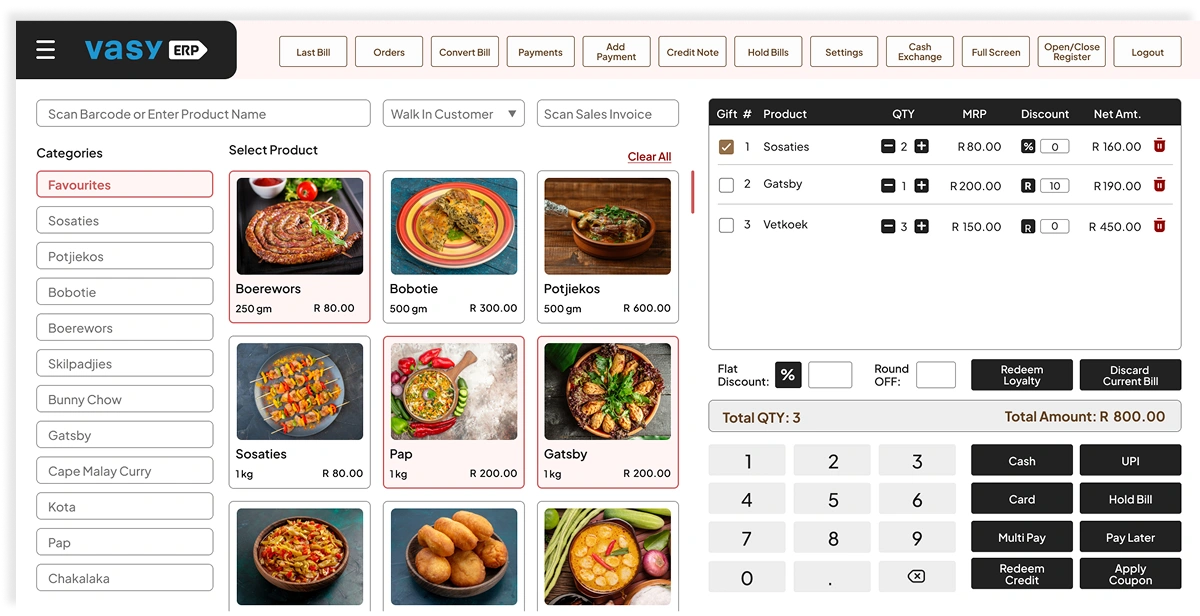
VasyERP POS helps retail businesses manage billing and store operations efficiently.
Key capabilities include:
- Fast billing and checkout
- Real-time inventory tracking
- Multi-location management
- Centralised reporting
- Integrated inventory and accounting support
- MPOS support for flexible billing
- Offline POS capability for uninterrupted sales
Stores benefit from these capabilities in practical ways. Checkout delays are reduced, stock records stay updated, branch activity is easier to monitor, and sales and product trends are easier to review.
Integrated inventory and accounting support helps keep records aligned, while MPOS gives staff more flexibility to handle billing and payments on portable devices. Offline POS capability also helps stores continue billing during internet issues.
Using one system for billing, inventory management, and performance tracking reduces the gaps that often create manual errors and affect revenue.
If each transaction updates stock and financial records automatically, businesses do not have to spend as much time resolving avoidable problems. A reliable system keeps records clearer and makes business decisions easier to support with data.
FAQs Regarding POS system
A shop checkout system is a common example. Products are scanned, the bill is calculated, and payment is completed. The transaction is recorded, and a receipt is given.
Yes, many POS systems allow billing without an internet connection. Sales are saved on the device and sync automatically once the connection returns. Some functions, such as viewing reports from another location, may need internet access.
No. POS systems are used in shops, restaurants, salons, and clinics. They record sales and are part of the billing process.
A POS system is used to handle billing and record sales. An ERP system manages wider business functions such as inventory, accounting, and purchasing. POS focuses on transactions, while ERP helps manage overall operations.
Last Updated on July 2, 2026