Hardware Requirements Checklist for a Supermarket Billing Counter
July 30, 2026

Quick Summary:
The right supermarket billing counter hardware starts with a POS terminal, barcode scanner, receipt printer, cash drawer, payment setup, network connection, and backup power. Stores selling loose goods also need a verified weighing scale. Every component should be tested with the retail POS system before the counter opens. As such, you should choose the essential hardware for accurate, steady billing, match scanners, printers, scales and payment devices with your POS, plan for GST billing, UPI and weighted products, compare hardware budgets and test compatibility before opening.
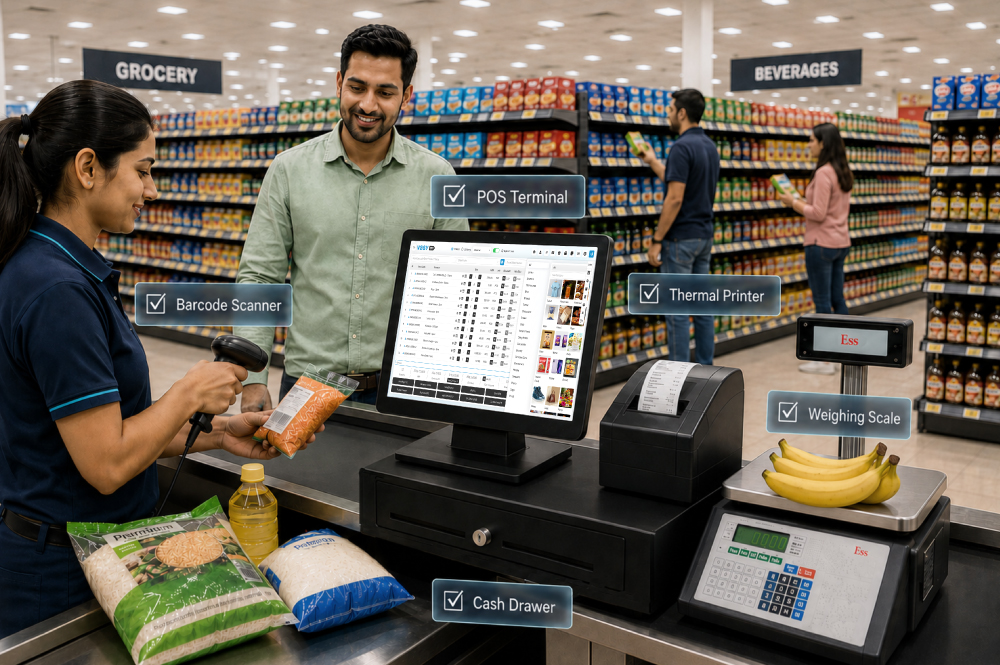
We have all been there. A queue builds when a scanner struggles, a printer jams or the payment device loses its connection. The software may be ready, yet the counter slows because one component cannot keep up. A reliable supermarket billing counter hardware setup brings the POS terminal, scanner, receipt printer, cash drawer, weighing scale, payment device, network and backup power into one working system. Each component must suit the billing software, product range and expected number of daily transactions.
Did you Know? Modern scanners can decode at least 40 items per minute. Barcode size and placement can still affect performance at the billing counter.
Start with the devices used in almost every transaction. Buying them separately works when the ports, drivers and operating system support the same POS hardware setup.
Choose a commercial desktop, mini PC or all-in-one terminal with a supported operating system. For a new counter, 8 GB RAM, a 256 GB SSD, Gigabit Ethernet, and spare USB ports form a sensible baseline. A 15-inch touchscreen is convenient, while a keyboard and mouse help with customer details and troubleshooting.
A 2D imager reads standard retail barcodes and QR-style codes. Fixed presentation scanners suit continuous counter scanning, while handheld units help with cartons and products that cannot be moved easily across the counter.
Check print speed, auto-cutter, USB or Ethernet support, drivers and the drawer connection. Test the GST invoice layout, customer address, discounts and loyalty details.
Use scale integration for loose produce, bakery products and other goods sold by weight. Confirm that the correct item, weight and rate reach the bill. When buying a commercial weighing scale, confirm that the model is suitable for trade use and that the instrument carries a valid Legal Metrology verification stamp.
Payment, internet and electricity belong in the billing machine requirements. Leaving them for installation day creates avoidable gaps. Check each lane for:
UPI may use a static or dynamic QR, but the cashier needs a confirmation process. A completed payment without a matching sale should be easy to find during closing. The same applies to cards, wallets and split payments.
Optional hardware should solve a clear store problem. Useful additions include:
Tip: Add hardware when customers feel the delay. A second scanner may improve one lane more than a customer display, while an MPOS point may help more than upgrading every terminal.
A device description saying “POS compatible” does not confirm that it will work with your catalogue and software. Complete these checks first:
Record each model, serial number, connection, driver version, warranty and assigned counter. Keep one approved configuration across branches where possible. The implementation checklist should also include a complete sale on backup power.
Did you Know? Digital wallets accounted for 33% of global in-person spending in 2025, according to Worldpay’s 2026 Global Payments Report. Payment testing now has to cover a wider mix than cash and cards alone.
The figures below are indicative planning ranges rather than fixed market prices. Final costs depend on the terminal specification, scanner, scale, backup power, warranty and installation requirements.
| Setup | Suitable For | Indicative Hardware Budget |
| Starter counter | One lane, packaged goods, moderate billing | ₹50,000–₹75,000 |
| Standard counter | 2D scanning, scale, UPS and stronger networking | ₹80,000–₹1.3 lakh |
| High-volume lane | Commercial POS, presentation scanner, customer display and stronger backup | ₹1.4 lakh and above |
These estimates exclude software, GST, installation, payment terminal charges, cabling and annual maintenance. Do not cut backup power or choose unsupported equipment merely to lower the first invoice.
Assign one person to inspect counters weekly and record recurring faults.
Keep a spare scanner, printer cable, power adapter, receipt rolls and network cable on site.
Tip: Store the emergency kit in a labelled box with a one-page replacement guide and support numbers.
Hardware performs best when every device contributes to the same transaction. VasyERP’s supermarket billing software integrates POS billing and barcode management into a single workflow. Barcode and weight-based billing can connect with GST invoices, stock movement, multiple payments, discounts, loyalty and reports. The Desktop POS application runs billing through a dedicated counter application and synchronises with the cloud, reducing dependence on internet speed. Multi-unit stock visibility supports goods purchased by the case and sold by the pack or piece. Scale integration handles products billed by weight. For a multi-store business in India, keep terminal names, counter IDs and payment mappings consistent. Multiple counters, UPI, mobile invoices and central store visibility can then follow the same operating process.
Contact VasyERP today and simplify your Supermarket Billing operations with smart business automation. Avail a Free Demo Now!
A basic counter needs a POS computer, display, barcode scanner, 80 mm thermal printer, cash drawer, payment setup, network connection and UPS. Add a verified weighing scale when goods are sold by weight.
A 2D imager is the safer choice for a new counter because it reads common 1D retail barcodes and 2D codes. Test it with packaging and store-printed labels.
Yes, provided the scale, interface and POS use a compatible data format. Test that the item, weight, rate, GST treatment and stock quantity reach the bill without manual re-entry.
That depends on the POS design and payment method. Prepare local billing where supported, automatic synchronisation after reconnection and a backup connection for payments that need internet access.
A dependable billing counter starts with hardware that can handle everyday store activity without slowing down transactions. The POS terminal, barcode scanner, receipt printer, cash drawer, weighing scale, payment devices, network connection and UPS should all work together as one setup. Before installation, check device compatibility, available ports, driver support, power requirements and billing software integration. Test scanning, printing, weighing, payments and offline billing under normal and peak conditions. Regular cleaning, spare accessories and scheduled maintenance will also help prevent small faults from interrupting checkout.


Top 5 POS Software for Hardware Store blog gives an ove...
February 27, 2026

When it comes to features, POS software solutions can b...
August 21, 2023

July 30, 2026

July 10, 2026

July 8, 2026

June 15, 2026

June 5, 2026